Dismiss
Innovations
Everpure Simplifies Enterprise AI with Evergreen//One for AI and Data Stream Beta
Accelerate the transition from pilot to production with benchmark-proven performance, automated data pipelines, and a flexible consumption model.
Dismiss
June 16-18, Las Vegas
Pure Accelerate 2026
Discover how to unlock the true value of your data.
Dismiss
Innovation
A platform built for AI
Unified, automated, and ready to turn data into intelligence.
What Is an S3 Lifecycle Policy?

Well-written Amazon Simple Storage Service (S3) lifecycle policies are essential for efficient data management, cost optimisation, and streamlined storage solutions in the cloud, as they help to ensure seamless handling and protection of data throughout its lifecycle.
What Is Amazon S3?
Amazon S3 is a highly scalable and secure cloud-based object storage service offered by Amazon Web Services (AWS). It allows businesses to store and retrieve any amount of data at any time and from anywhere. S3 stores data in containers called buckets, which store data as objects. These objects can be anything from images and videos to application backups and large data sets.
In Amazon S3, objects represent the data you store. An object contains the data itself, a unique, bucket-specific key acts as the identifier, and metadata that describes the object. Objects can range in size from a few bytes to multiple terabytes.
While the flexibility of storing diverse data types in S3 is invaluable, it's also important to be able to efficiently manage these objects because all objects take up space. Unused or infrequently accessed data can accumulate, leading to increased storage costs and reduced overall system performance. This is where S3 lifecycle policies come into play.
What Is an S3 Lifecycle Policy?
An S3 lifecycle policy is a set of rules that define actions to be taken on objects in an S3 bucket over time. These policies allow you to automate the transition of objects between different storage classes (such as moving data from standard storage to infrequent access storage) or even delete objects after a specified retention period. Lifecycle policies are highly customizable, allowing businesses to tailor their data management strategies to specific needs.
Lifecycle policies work based on predefined rules set by the user. These rules specify the conditions that an object must meet to trigger a particular action. For instance, you can create a rule to transition objects older than 30 days to a cheaper storage class like Glacier, which is suitable for archival purposes. Similarly, you can create rules to permanently delete objects that are no longer needed after a specific timeframe.
Benefits of Implementing Lifecycle Policies
Implementing S3 lifecycle policies offers several benefits to businesses:
- Cost optimisation: By automatically moving less frequently accessed data to lower-cost storage classes, businesses can significantly reduce their storage costs without manual intervention.
- Efficient data management: Lifecycle policies streamline data management by automating the process of transitioning objects between storage classes or deleting them, saving time and effort for IT teams.
- Compliance and security: Lifecycle policies can help enforce data retention policies, ensuring compliance with regulatory requirements. They also enhance security by automating the deletion of sensitive data after its required retention period, reducing the risk of data breaches.
- Improved performance: By keeping the storage optimised and clutter-free, lifecycle policies contribute to improved system performance, enabling faster data access and retrieval times.
S3 Lifecycle Policy Examples
Here are some common S3 lifecycle policy examples:
Deleting Objects
One common use of S3 lifecycle policies is to automatically delete objects after a specified period. For instance, businesses can set up a policy to delete temporary files or logs older than 90 days, ensuring that unnecessary data does not clutter their storage space indefinitely.
Moving Objects
Lifecycle policies can also be configured to move objects between different storage classes. For example, you can transition frequently accessed data to the S3 Standard storage class for optimal performance and move less frequently accessed data to the S3 Intelligent-Tiering class to save costs without sacrificing availability and latency.
Archiving
S3 Glacier and S3 Glacier Deep Archive are cost-effective storage classes suitable for long-term archival. Lifecycle policies can be set to transition objects to these storage classes after a specific duration, allowing businesses to archive data securely while minimizing storage costs.
Amazon S3 Lifecycle Transitions
S3 lifecycle transitions are automatic movements of objects between storage classes as specified in the lifecycle policy. Transitions enable businesses to optimise costs based on the access patterns of their data. For example, infrequently accessed data can be transitioned to lower-cost storage classes, reducing overall storage expenses.
A common transition rule might involve moving objects from the S3 Standard storage class to the S3 Intelligent-Tiering storage class after 30 days of inactivity. If the data remains inactive for another 60 days, it can further be transitioned to the S3 One Zone-Infrequent Access storage class, offering even more significant cost savings.
How to Create an S3 Lifecycle Policy
To create an S3 lifecycle policy, you first need to create an S3 bucket.
To create an S3 bucket:
1. Log in to your AWS console and enter S3 in the search bar.

2. Select S3 service.

3. Click “Create Bucket.”

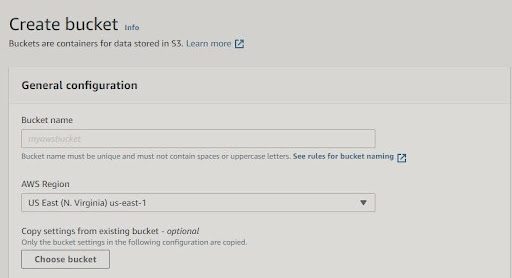
4. Give your bucket a unique name and specify the AWS Region where you want Amazon S3 to create the bucket. You can check pricing by region here.
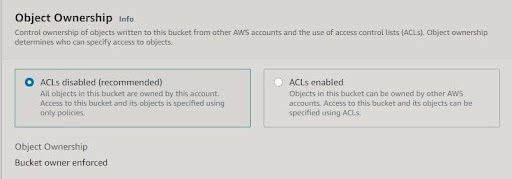
5. Decide on object ownership. If you want to keep object ownership, leave the Access Control Lists (ACLs) disabled. If you want to give ownership to the account that uploads the files to your S3 bucket, enable ACLs.
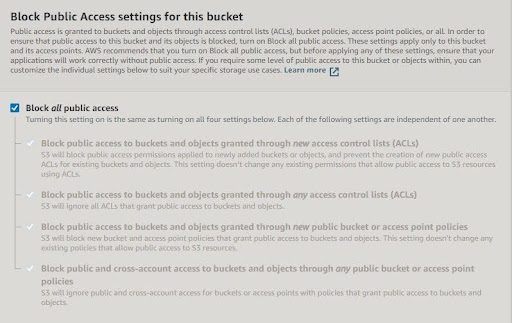
6. Choose if you want to block all public access.
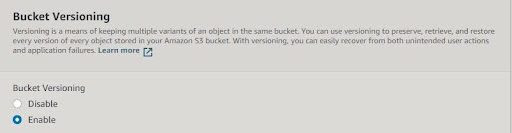
7. Choose if you want to enable bucket versioning.
8. Once you see the following message, you’ve created your bucket.

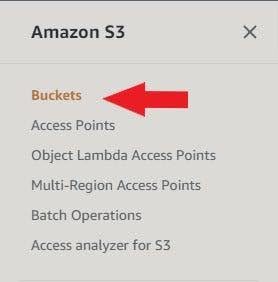
9. You can see your buckets on the left side of the S3 console.
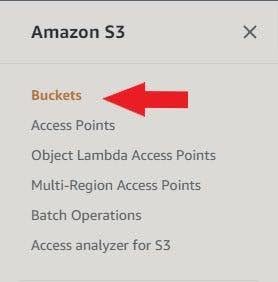
Now, you’re ready to create an S3 lifecycle policy. To do this:
1. Open your bucket.
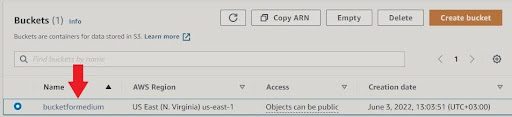
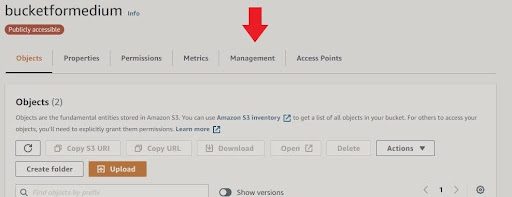
2. Click on the “Management” tab.
3. Click “Create lifecycle rule.”
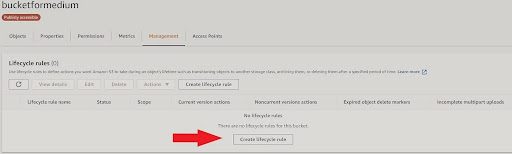
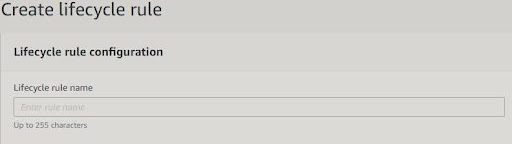
4. Choose the rule’s name and scope.
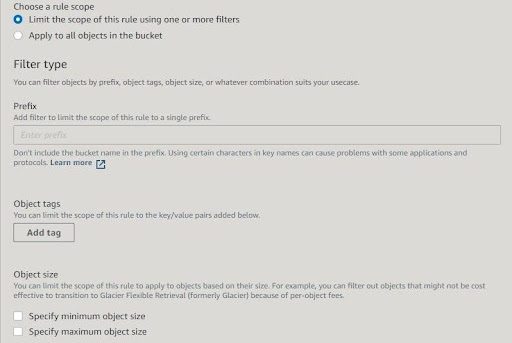
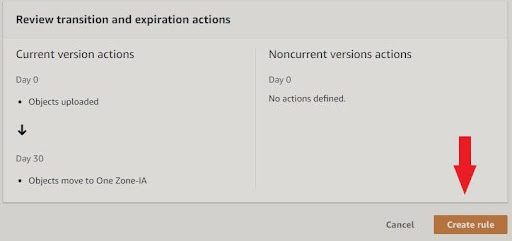
5. Specify the transition for each option.
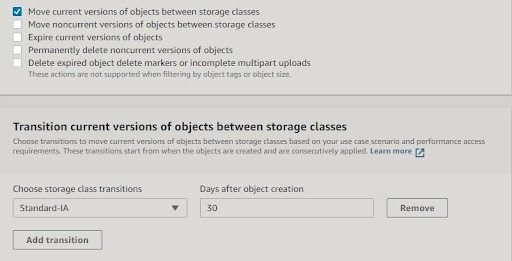
6. Click “Create rule.”
Best Practices for Creating S3 Lifecycle Policies
There are three essential best practices for creating S3 lifecycle policies:
- Regular review: Periodically review and update lifecycle policies to align with changing business needs and data access patterns.
- Clear documentation: Document the lifecycle policies thoroughly, including the rationale behind each rule, to ensure all team members understand the implemented strategies.
- Testing: Test the policies in a non-production environment to ensure they behave as intended before applying them to critical data.
Why Everpure Cloud Dedicated and FlashBlade for S3
Everpure FlashBlade® has AWS Outposts Ready status, meaning it can work side by side with AWS Outposts in a customer’s data centre. It also means AWS customers can leverage a low-latency, high-performance, unified fast file and object platform with native S3 capabilities in tandem with AWS services, APIs, and tools. This enables things like AI/ML, modern analytics, DevOps, backup and recovery with rapid restore, and ransomware mitigation.
You can also leverage Everpure Cloud Dedicated, which uses the native AWS resources to enhance storage services with enterprise features that significantly reduce your AWS storage costs. Refer to the implementation guide for a full tutorial on how to successfully deploy a new Everpure Cloud Dedicated instance in your Amazon Virtual Private Cloud (Amazon VPC).
We Also Recommend...
Browse key resources and events

TRADESHOW
Pure Accelerate 2026
Save the date. June 16-19, 2026 | Resorts World Las Vegas
Get ready for the most valuable event you’ll attend this year.

PURE360 DEMOS
Explore, learn, and experience Everpure.
Access on-demand videos and demos to see what Everpure can do.

VIDEO
Watch: The value of an Enterprise Data Cloud
Charlie Giancarlo on why managing data—not storage—is the future. Discover how a unified approach transforms enterprise IT operations.

RESOURCE
Legacy storage can’t power the future
Modern workloads demand AI-ready speed, security, and scale. Is your stack ready?
Personalize for Me