Dismiss
Innovations
Everpure Simplifies Enterprise AI with Evergreen//One for AI and Data Stream Beta
Accelerate the transition from pilot to production with benchmark-proven performance, automated data pipelines, and a flexible consumption model.
Dismiss
June 16-18, Las Vegas
Pure Accelerate 2026
Discover how to unlock the true value of your data.
Dismiss
Innovation
A platform built for AI
Unified, automated, and ready to turn data into intelligence.
45:30 Webinar
Powering the Autonomous Enterprise with Pure1®
Discover how Pure1® uses AI to deliver self-service, automated storage ops with intelligent diagnostics, insights, and performance tools.
This webinar first aired on June 18, 2025
The first 5 minute(s) of our recorded Webinars are open; however, if you are enjoying them, we’ll ask for a little information to finish watching.
Click to View Transcript
Hi everyone, thank you for joining us. My name is Pyle Srivastov. I am part of the product management team with me. Uh, we have KP. He's, uh, a senior product manager at Pure Storage, and we have Brian White joining us who's one of our esteemed customers from
Match.com. Um, you'll get to hear. Brian's experience as well as you know how he uses PR one in order to optimize, you know, storage operations. So hang tight. I think, uh, he's got a lot of practical, uh, you know, learnings to share and while we talk about some of the new features that are
coming in. I'm also here for comic relief. That's great. Um, awesome. So, uh, Pier one, right? So this is, uh, this is a cloud management, uh, and analytics platform that's available to you through Pure Storage. Anytime you're buying a pure product, this is already available.
Right? Um, it works on the phone home data, the telemetry that you send out. We are, I mean, it's a fairly large scale operation at this point. We get petabytes of data, uh, north of even 50 petabytes, uh, Uh, within a year, much, much more, and that is all put to good use.
Uh, it is metadata we cannot look into your data, but it is put to good use one in terms of providing you with the monitoring and management capabilities, some of the insights as well as, you know, some of the AIML like anomaly detection, what's. You know, if you're looking at sustainability where where are you according to your peer group, right?
A lot of that information comes from, from this. So we're, we're training the models on the metadata only. It is absolutely anonymous, but the idea is that, you know, there's so much information that's coming that we are able to make a fairly accurate prediction. Some of you will hear about workload planners.
Some of you may already be using it, but that's one of the goodness that you get out of it, right? Uh, it is, it is, uh, based on artificial intelligence enablement, uh, that is one of our, uh, design, uh, principles to use AI wherever we can, both structured and non-structured. Uh, we have already taken a leap into generative AI.
If you, some of you might have logged in. How many of you actually saw the AI co-pilot and have played with it? In Per one. A couple. Yeah, we launched it like last, uh, last month. So if you haven't had a chance, you know, just go in, uh, you do have to acknowledge, you know,
some of the fine print. Uh, because we use OpenAI in the background just from a, from a natural language interface perspective, but your data is safe with us. Uh, it's not going out into, into, into the internet. Um, however, it is a path that we are moving towards in order to create more simplicity as
you manage your storage operations, right? The other tenant is that it isn't as a service. It's available to you everywhere. You are, you have a browser access as well as our new mobile application, um, that has recommendations as well as, you know, ability to do these support cases and everything. Are you guys using the mobile application,
the new one? OK, a few. Yeah, awesome. Would love to hear feedback on that. OK, so next slide we will be talking about, you know, how Pier one manage helps you manage in terms of planning, deploying or order tracking, monitoring and managing.
I think, you know, you, you, you guys are probably very familiar with the monitoring part and then you know, the 3rd, uh, third scale is really about optimization. One of the key pillars is cyber resilience. uh, PR takes, uh, cyber resilience as one of a core tenant for storage operations, and I wanted to, I want to show you what all is available within Pier one that you can use from,
from the principles of not just, you know. There's backup and recovery, but within Pier one, you can really look at your readiness as well as your visibility. And now, uh, intelligent orchestration or intelligent response as a result of being, uh, responding to any cyber resilience needs.
So on planning and deploying, uh, we, we have a very proactive approach to, uh, planning, uh, both in terms of capacity planning, as well as in terms of asset life cycle management. And then we'll also talk about some of the new ways that you can, you can look at deployment and refine the user experience, um,
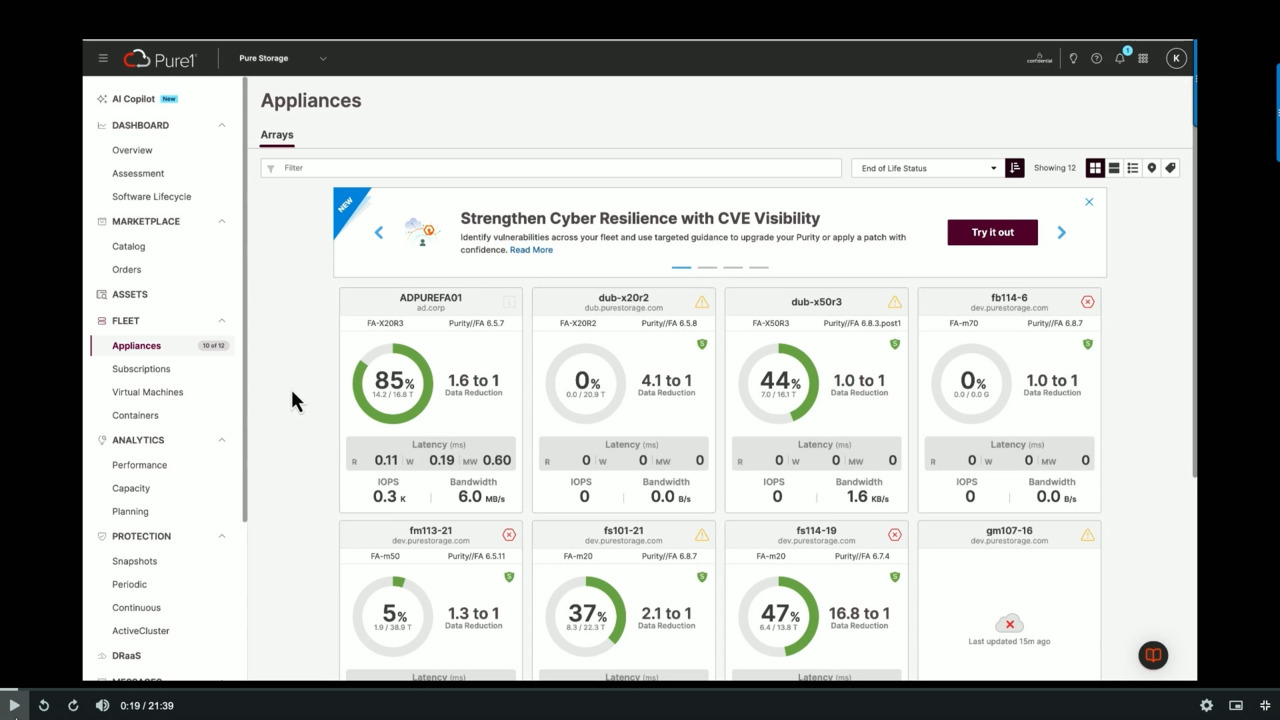
and make it more efficient. So let's let's get into some of the demos. So this is all, you know, show and show and tell, uh, will not bore you with a lot of slides. So here, you know, we've logged in into PR one. This is your landing screen, of course you're getting a lot of, you know, appliance level cards which I'm sure a number
of you are already familiar with up on top, you know, I just want to draw your attention a little bit. There is a status bar on the bulb icon. It shows the recommendations, any proactive recommendations available to you. And then you can filter in terms of end of life status, uh, any compliance, you know, related things those would normally let's say your renewal is coming
up, um, or you have a critical error, um, or you have an end of life hardware, but if you're part of Evergreen forever, you don't have to worry about that at all. Uh, but those are the things that will draw your attention as the top priority, but this is really giving you a lot more in terms of appliance health. So let's get into, you know, uh, the planning cycle.
Every year you're probably being asked how much do you need for the next 18 months or 36 months and. It's hard. It's hard to project in a number of cases. What we hear is, well, you know, let me just do what I'm using times 2X3Xs because you're always afraid that the budget is gonna go away, right?
Um, this, the tools that we have available are really giving you a much more proactive way of thinking about planning and budgeting and being on point. So let's go into catalog. Uh, when you're coming in, you know, the bell icon is showing you there's some active proactive recommendations for you.
Um, these recommendations could be as simple as hey, you're coming up for, uh, support contract renewal, uh, which again is going to hit, you know, some of the maintenance side of things, um, on the maintenance budget, but it's also gonna give you some, uh, additional recommendations here it's telling you about,
uh, projected capacity so it's used. The AI models that you will see in workload planner will will hit that as well. But here we have these models running constantly in the background. Pier One is watching and doing its things 24/7, right? So these recommendations are coming out and it's not that you have to take them as is,
but what we are trying to avoid is any situation where. You know you're getting into a little bit of a situation where you don't have enough capacity or performance or you have, you know, anything that is noncompliant. So let's click on the recommendations. We'll click on, you know, the capacity recommendation and here it's telling us the the
letters in green are really showing what is the recommendation? What is the next capacity that you should be going to and it also provides you a little bit of a reference point on why this recommendation is coming to you because it could be, you know, you're watching this recommendation a little bit after. Um, uh, after the fact, so maybe you didn't come in in 30 days or 60 days,
and even though you got notified or, you know, maybe some of your peers got notified, situation may have changed so you have an explainability on the recommendation as well as what is, you know, the mystery is not there at least you know what's the next that you would want to take based on the forecasting model on based on your current usage as well as, you know, the next 3 months, right?
Um, so let's click on advanced options. I like the recommendation, but I want to play with it because Pier one obviously doesn't know you have a huge project coming up that you're gonna service as part of this array. So I can go in and pick the right capacity. The things in red basically are model focused, so if something doesn't apply, it will not let you select.
Once I'm here, as you can see, I have, uh, you know, on the, on the left, it's showing me the load on the right chart. It's showing me the capacity. And based on the capacity that I have changed, it's actually going to show me the dotted line in terms of, you know, where my uh what my forecast was and then now that that I've added,
where is it in terms of percentage used right? and you can play with that um it could be that you say well no I'm gonna you know take off or. Migrate a certain workload and this is not something that I really want to do um and that's perfectly fine on the right side I just want to draw your attention to the energy side. You heard Nikki's talk about uh sustainability as you are changing, you can change your controllers, you can,
you know, simulate controllers different capacity. It'll also tell you, you know, the impact on your current energy. And we have a lot of customers in Europe who are very, very much sensitive to, um, you know, the changes in the power packet. So from here I can request a quote.
This will actually, uh, let your account team know that you are interested in uh in this particular quote. It'll give all the details and. There we go. So we have submitted it. If you want to change your mind you can still again go into the simulation and then you're
done, right? Your request is gone, uh, somebody in the accounting will come in and work with you and you could do that with multiple of these, you know, multiple arrays in your fleet. This was really about proactive recommendations. What we have seen is that a number of customers before, you know, a lot of customers would go into workload planner,
which is what we are gonna show. Sorry guys, I'm just facing a technical glitch. OK, um, number of customers would start with workload planner and start from scratch, but proactive recommendations gives you a really good start because you can start, you can think here, start from here, and start looking into the budget planning,
right? So can we go into the planner. And I'm gonna give a real world, um, actual dollars cost saving, uh, example of this kind of this exact process, uh, a little bit later so it kind of makes it kind of brings it into the real world because this is kind of conceptual right and you're kind of thinking, you know what.
What's what's the value prop and I'm gonna go into the value prop later so absolutely um so here we are in the planning on the left, you know, we clicked on the planner and it's really showing you that you can do hardware simulations, you can take workloads and you can think about migrating those workloads if you are thinking about, OK, you know, 2 years from now. Uh, some of the cycles are much longer.
My workload is going to go 3X. We will actually show you that you can scale your workload and then you can put it on another array or you can take it into a phantom like a virtual, you know, uh, or a simulated new array. With a different controller with a different capacity perspective and do all sorts of
planning it, it's really now you do not have to over provision you do not have to overbuy because you have the tool in your hands it's based on your usage. Your usage patterns, so the ML models are working basically we are giving, you know, a more of a here's how it's performed we do take our own sizing based on our lab lab environment, but here the forecast is really tailored to your environment.
OK, and this is really what we use as well, so there is no mystery to it, right? Again, the transparency and the visibility here. um, if we go further, uh, I can just create the whole thing if you don't want to request a code, I can create all my simulations and just export them and take them off into, you know, talking to your accounting.
Another area that I wanted to show you is now those were, you know, arrays that you got prodded on because of proactive recommendations or the arrays that you knew or the workloads you knew about. Here's another feature where you're looking at your fleet overall and anything you know that is between the dash line both on top and. On the on the far right is really where you are
running out of space or running out of performance and you can then really take take this into consideration and take you know one of the arrays maybe you have an array that is not really getting utilized so instead of buying more you can simulate that workload migration. And plan on, you know, maybe at the first of the month or something I'm just gonna migrate my workload and I don't need to buy more,
right? So a very good view of fleet level planning available to you. Now let's say I've requested the code. Here is orders. Uh, before it used to be a mystery. You're always thinking when am I gonna get my
array? Where is it? Is it on time? When do I get an install? So now the order order actually gets tracked and you can put in the scheduled dates. So when you want, let's say you bought a new
array or you bought an expansion. And you want to bring in your in the install services. Of course this is we have a view to our professional services, the pure professional services, so it's their calendar that we would be basically, you know, tying into but this gives you the ability to select certain time frames and
windows in order to schedule your, your array installation. um, here I have it. The schedule in progress once this the the dates are provided, you know, they will get confirmed, uh, with a slot of your choosing. Uh, we do look for a few options and then if an order is fulfilled,
you know, you can also start looking at on the tracking side on where we are, you know, if it's completed, if it's installed, when was it installed and all of that information. This is a big part of the budgeting as well because you know a number of times people will look at you know what did I buy or what you know where is it in my inventory that's why you know we we brought this into the budgeting
aspect now I have my arrays. I have all of this information now I want to look at my asset life cycle because my third part is really about managing my renewals. And if you are an evergreen, uh, forever customer on the far right, you can see that we are actually providing you visibility on when you are available for that
free every 3 controller that ever ever modern upgrade. It gives you the date, it gives you the reason. So let's say you're looking at a 2 year renewal or a 3 year renewal, but maybe. You know, one more year will allow you to refresh earlier,
you know, qualify for that upgrade, and Brian's gonna talk a little bit more about that, but you know, this is, um, this is a key feature for you to take advantage of all the programs that are available, um, and, and schedule your own, you know, renewals within the time frame when. You want things to be upgraded. You can also use the workload simulator to start looking at projected load based on the
recommended array. So if you're gonna be moving from like a R3 to an R4 as part of that upgrade process, you can actually start forecasting with the overhead that you're gonna have on that platform and not just the current platform which really helps you work with that kind of life life cycle management.
Awesome and this is a visual, uh, visual cue. It shows all the value that you're getting as part of the Evergreen forever, um, subscription. Same thing is available for Evergreen one, so there is subscription genealogy and appliance genealogy. We'll hit the subscription site in a little bit of time, but here, you know, it's giving you when we were when we.
We were upgrading and if you didn't upgrade that's fine it'll show you that as well and then on the far right, it's also telling you that when the next renewal is due, right? In this case, um the customer really went from M20 to an X20 and then they basically kept their capacity the same, but they took advantage of the ever modern upgrade.
OK, so with this we are basically, you know, showing you how to proactively come in, plan your environment, manage your budget, and then track your orders. And with that, I'm gonna hand off to KP to talk through monitor and managing. All right, thanks, Kyle. Everyone, so I'm going to talk about the second pillar which is, uh, monitor and manage.
So as most of you know, uh, Pure one gives you one stop ability to monitor and manage your infrastructure. Whether you're looking for a full stack observability of your storage or looking to get a complete view of your subscriptions, no one has it all. So I'm going to try to cover the key and the new items that we have launched for this pillar with two demos.
The first one would be for the unified storage observability, and the second one would be for end to end subscription management. So for the first one, I'm going to start with the pure AI co-pilot. Now Pure AI copilot revolutionizes the entire storage management experience for you all. You'd no longer need to have knowledge about various dashboards to get started.
If you're a new customer, you can come in and ask a variety of questions and get started. You can ask different types of questions across your capacity across your performance across your security, or even what's new in the latest release of Purity, and you can get all that information from a place within Pure One. So let's see, let's see it in action. So let's say if I go in and ask a question on,
uh, how do I enable. The snapshot retention on Flash array, and it gives you a step by step breakdown on how exactly to enable it. Again, within Pure one at your fingertips. So think of this as your own support companion 24/7. So this was one question that I asked and I got
detailed information. It is also combined with various sources. So you can actually look up the sources and make sure that you have all the information that you need to perform the action. Let's try one more. Let's try a different question this time. So I'm trying to understand what arrays are using more than 85% of the available capacity.
And it gives me, it goes through all the usage data and tells me that, hey, two of your arrays are running more than 85% of your capacity. And then I can continue with my troubleshooting and get more information here. Hey, what volumes, what can I move, what can I balance. But just for the sake of this demo, let's go to another place within Pure one where you can get
a complete fleet view. So I'll go to the appliances screen here. And then as you all know within appliances, um, your one lets you see all your fleet arrays in one place so you can also choose the order in which you want to see these arrays for you or your appliances for you. Here I have, uh,
ordered them descending based on percentage full, and you can see that those two arrays which co-pilot told me were using more than 85%. Capacity are shown at the top. Also this is like the complete view of all your arrays one card per day. I can see that which arrays are already covered with safe mode. I can see which one of them have critical alerts.
So I see that the one which was running at about 88% had some alerts, some of them which are critical and some of them which are informational. For this one I see that there was an alert created when it hit the 85% mark and I could have just seen this and did the needful if this is, uh, a critical critical array of importance.
How do you make sure that you get on top or you stay on top of all such alerts proactively? So within Pure one we have launched something called the notification center. So when you go to this bell icon on the top right, you will see all the notifications that you are subscribed to. Now, if you are not subscribed to those notifications, it's very easy to do that. You hit this gear icon and you will see all the
different subscriptions, sorry, all the different notifications that are available for you to subscribe to. So I see that the alerts one is the one at the top. I will expand that and I will hit subscribe from the right. You can choose which form factor or which channel works best for you. We have one manage web,
we have Pure on mobile app push or your email. If you want all three of them, you can just check all three of them. You can choose the frequency if daily is too much for you, if you just want it once a week, you have that option as well, as well as you can choose which severity works best for you. And then you can make those choices and then move back to Pier one and starting immediately,
you will start getting those alerts proactively. So that is how Pure one manages your alerts so that you do not miss any critical event and your story story is always covered. Uh, you can do a lot of different analytics within PPR one across performance and capacity just for the sake of the demo. Let me just show you some of the things on
performance. We have launched a lot of different reports across the stack for both performance and, uh, uh, capacity. You can look through those and see, uh, if you want to do any analysis outside Pi one. So I come to this arrays tab. Uh, if I look at the right, I can see some key performance metrics like latency,
IOPs, bandwidth. Uh, I can select one of the arrays and then at the bottom, I can see the graph of the key metrics like latency, IOPs, etc. If there is any, any area which, uh, I need to, uh, focus more on, I can just look at the graph, change the time frame and focus and move
accordingly. If you are a VMware customer. Pure one allows you to get a full visibility by your Venter, by your data center, by your cluster, the relationship between your arrays, your VMs, your data stores, etc. so that if you're trying to troubleshoot what part of your stack is creating a bottleneck,
you can go ahead and do that. So when you, when you select any one of the items, it will show you the visibility of the complete connectivity across all the items. And then when you select one of them, you can see the key metrics across all of them. Now within Pure one, we have something called the assessments.
So assessments give you a fleetwide view of your, uh, appliances across different vectors like security, data protection, sustainability and virtualization. Just for my part, I will just cover virtualization and sustainability and file in a few minutes we'll cover security and data protection.
Now with Broadcom's acquisition of VMware, we heard your concerns around cost and, uh, cost and performance, and we launched this virtualization assessment within PR one which gives you a full view of your VM utilization as well as potential cost savings. It also makes sure that the VMs continue to perform at their best. So you can come to PR one and you can get all that information in one go.
We also have something called the sustainability assessment, like Kyle mentioned. We are one of the greenest, uh, uh, storage arrays out there. You can get a full life cycle visibility of your emissions within Pure one in the sustain assessment. You can also see how you compare against your peers again from the same place.
We have also revolutionized the the support experience. It is easier than ever before to get access to to support. Uh, not only do you get, uh, co-pilot integration. Here to ask you to ask your questions, you can also go ahead and uh get support when you are trying to create a new case. So when you are creating a new case,
when you start typing something, you can start the as you can start seeing the associated documentation and start reading it and see if you still need to create a case or you're all set. So this makes support experience easier than ever before. So that was the first demo on the modern manage. We'll quickly go to the second one which is around subscription management.
So here too I will begin with a question on copilot around my SLAs. As you all know, Evergreen one comes with a set of binding SLAs. So I come here and I ask question around, hey, tell me how are my SLAs looking for my subscription, and copilot gives you information about all your licenses and the associated information. Now I can continue here or just For the sake of
the demo, I'll just go to the subscription viewer and show you how you can get information about your subscription, uh, in one place. So you can see whether or not you are covered by the cyber recovery SLA. You can request expansion from here and you can really get into the details of each SLA that you have, uh, that you have paid for.
Moreover, if you want to make sure that you are getting the most out of your subscription within subscription genealogy right next to the plans, which I just showed you guys, you can see how your subscription has evolved and how you are getting a lot of value out of your subscription. So this gives you a complete view of all your subscription all in one place within pure one. So with that,
I will hand it over to Pile to cover the last uh pillar optimize and scale. So we'll, we'll run through it because I think it's really good for us to hear from Brian. Uh, on the, on the cyber resiliency, right, it's really about readiness and visibility and now with our new workflow orchestration it's about intelligent response as well. So this is one of our new features enterprise scale IAM pure identity and access management.
We're starting with Pier one, but you will actually see. All of our products folded into IAM. We have, um, it's easy to integrate into SSO. We've heard, we've heard you, we've heard your feedback. So one of those areas that we hit now you can also create users and in here KP if you can
just go to the roll drop down. Uh, in the interest of time, so I can still create my external user if you have a partner, if you have an operator who's outside, but you know, needs access to some of your operations, you can create an external user. Now here you'll see a few new users here. We have a pier one operator user
and actually in there is a safe mode approval user as well. So ier one operator user is really for the. Partners or people you want to delegate within your organization, you don't want to give them this, you know, the admin, the full admin privileges, but you want them to come in and do some upgrades or you want them to do a little bit more of the configuration changes on select items you can
give them a pure operator role now and that was, you know, again one of the feedback that we got from all of you guys that I don't wanna hand off, you know, the keys to the kingdom to anybody who needs to do an upgrade, right? So, um, now here, if, uh, you know, there's a full center of different applications, it's log center,
IAM and support center. And then, uh, where are we going next? OK, so assessments, uh, there's a couple of new things we, uh, we'll look into security assessment. You can see we continue to enhance our anomaly detection.
We started with single variate metrics like performance, you know, in performance latency and bandwidth and all of that. You can, you can see the little squiggly. It shows that there's something anomalous going on in this particular array. I can even go in down here into the current anomalies and now we are also looking at
multi-dimensional multivariate uh anomaly detection. So now if you know something didn't reach that threshold that we have seen as the most the widest confidence threshold for detecting an anomaly, but you know, we're seeing something off between IOPs and bandwidth and latency and combined all three, then we would be able to catch that anomaly as well.
And then the other big thing is the CVEs uh again this was a very highly requested customer feature I want visibility into my CVEs what's impacting my environment and what are my recommendations here. So if I click on that, come into the assessment, it's telling you whether you are vulnerable, you get to assess them.
We will basically provide you the data as well as what versions you can possibly upgrade to. So it takes away a lot of that mystery, uh, from here. If you are on flash array, you can kick off a self-service upgrade. Flash blade upgrade, self-service upgrade is on the roadmap. It should be coming to you hopefully next year we'll be talking about it,
but you are here. You can start running your health checks, take the recommendation that was given, or maybe you have your fleet configuration management, you know, where you have a set parity version, you can take that and off you go. Now the last one is going to be the log center.
So again, you don't have to stream you don't have to do like integrations, of course, you know, if you want to, you can continue to do your integrations on the array level but here this is a new product. This is a new application that's allowing you to stream your logs with 3 clicks. And you can stream the audit session, the session, uh,
the, the audit log, the session log as well as the pair one log. It, it you can integrate it into your particular application like Splunk, Data Dog, or anything that honors open telemetry. You all you have to do is set up a connection and it will start, you know, sending those logs into your central console that you're using for cyber,
you know, management of your logs. All right, so I think with this, we are, you know, here we are I'm logging in and it basically shows you that. And then the last but not the least, you heard a lot about workflows. Workflows are available. It's available to you today.
Log into Pier one. It is unlimited availability, so you just have to click on I'm interested and somebody will reach out to you. We will enable workflow capability for you. It's a full featured functionality. For you to orchestrate a response you can orchestrate a response by connecting it to your Service now incident tickets through Slack
through pager duty. um, you can set up a complex rule of alert logic, um, and basically it will trigger those types of workflows automatically and, uh, provided to you. This is a low code, no code capability.
You will see that here we are, we have some templates like daily fleet Health. You can look at your recipes, you can take a copy of that, customize it, and, um, you know, there's 300+ connectors available. So all you have to do is say, yes, I'm interested and we will enable it for you. Use the samples to start with, reach out to us.
We're here to help you. It's limited availability, so we have a lot of bandwidth to help you with that. OK, so with that I'm gonna hand to Brian. So that's a lot of information and you guys are digesting all these different bits and baubles and all the things you've been so this is what I call the uh 3W slide,
um, and every one of these that you have a speaker or you have somebody that's coming in to talk to some kind of expertise you have this 3 W's. The three Ws are who is this guy, what's his deal, and why should I care? So on the who, uh, my name's Brian White a few people in here I, I know know me, but I run the my title is, uh, director of,
uh, platform engineering infrastructure services for Match Group E&E Brands, which is a big mouthful. Uh, the easiest way to say what I do is that I run the private cloud for Match.com and a bunch of Match.com dating brands. Um, I've worked at Match for almost 18 years. Um, I've been in the MSP space since pre Y2K, um.
Uh The so that's kind of the who you can decide whether you know whether I'm worth listening to or not as we go through this, but the main thing that you're trying to figure out is was this 43 minutes well spent right and and sitting here and and learning all of the features that Pier One has and that the new features are rolling out and uh we've got a use case where I'm gonna talk about how we've leveraged Pier one and kind of tie that back to
the actual business. Benefit that we've gotten out of it and that's a picture of me not I don't know what I was doing. I'm on the top of a mountain in Arizona and I can guarantee I was not caring about array capacity or array performance so I don't know what I was doing, but I can tell you what I wasn't doing, which wasn't caring about my storage fleet because
what I like to refer to is the little orange robots, which is all the AI and telemetry that's built into Pier One, the little orange robots were worrying about that, so I'm over there just screwing around. Um, we can go ahead and go to the next slide. So what does Match do?
A lot of you have probably heard of the brand. Um, it says up there, but if it didn't say, you probably think Match is probably about 15 years old, about 20 years old, something like that. Um, we turned 30 last month, and to put that in context, there's a site on the internet called Amazon something like that that sells books.
Uh, they turn 30 next month. So we are 2 months older than Amazon and what I like to say is one of the biggest benefits that we have from a competitive posture is that we have more data and more telemetry on online dating than anybody else in the world, but one of the biggest challenges that we have from an operation standpoint.
Is that we have more data and more telemetry on online dating than anyone else in the world so our DLP processes our our our data inventory or storage inventory is obviously very top of mind for us so we carry a lot of data we have users. Data we have dev data we have analytics data we have corporate data we have data about the efficiency of the analytics data that's being used for the user data like we have so much data we have data about the data about the
data about the other data and the way I like to say is that businesses these days, they run on data like I think of it as like an old steam train right? You're just funneling data into this thing and you're barreling down the tracks and you're hoping you're headed in the right direction. Um, the way that we, we are comparatively new Pure customer.
We were on other vendors stuff for quite a while before that, uh, we chose Pure because it was best to breed and we, we needed the simplification and the power savings so that we could focus on, on other tasks. Uh, my team is being tasked more and more like most people are to do more with less, and one of the things we decided was we needed to
simplify our and reduce the. of storage devices and simplify the management of storage devices. So what that means for us is we use Flash AC for commodity capacity data. We also use Flash AC for performance data because we get so much performance out of Flash AC we can use it for a lot and the, the, the value prop is very high on it.
And then for anything where we require sub millisecond read and write latency we're using flash array X and then um we have the ability using all these forecast tools and all the analytics are built in pure one to determine if workloads can be migrated from the Xs to the seas to free up controller capacity on the Xes so we can really use the whole buffalo on our data state um.
And uh we don't have flash blade yet but I have so many quotes in my inbox right now because we're looking at both AIML and also scale out uh S3 compliant workloads that we're looking at insourcing uh from the cloud. So one of the things that we are doing as a brand is our silo and Match Group we also own these brands called Tinder and Hinge which you've probably heard of.
Is that we're looking at workloads that we can insource from the hyper scalers and part of our competitive hybrid cloud strategy is take everything that makes sense from a fiscal and technology standpoint in the hyper scalers and use them where they add value and anything where it's just compute. And we're spending more margin on it being in the hyper scales than they're providing value
we're bringing that back into our data centers so we're very aggressively insourcing out of the out of the cloud we can click on the next one. So where does pure one fit in so. My storage team has a combined about 90 years of experience managing very complex storage environments. Uh, all of us come from the MSP space,
uh, between. Uh, between us we've managed hundreds of arrays in different places going back to when, uh, raid concatenation of parity groups and all that stuff was a thing and you're like why does a team that has that level of firepower and storage engineering need something that makes everything simple and the short answer is because we have to do everything else we don't have time to focus on a bunch of scripting
tools of creating all that integration of doing all the things we used to have. To do with storage when we were just a storage team, right, we're never just a storage team, but, but you know we have so little and we have to do so much now like our scope of work has increased so much that we leverage very highly on the little orange robots as a force multiplier for our team so.
What does that mean in reality? So go ahead and click the next slide, so. When Pure one does tracks all of our subscription in one place, we can click on it easily. What that does, what it does is it frees us up time while the orange robots are doing that, then we can track track the subscriptions of all of our software,
all of our hardware, everything else that goes in our private cloud operations through all kinds of weird and arduous draconian systems that all those things are in knowing that the data state at least is an easy button for us, uh, same thing with, uh, with telemetry with capacity, um. If you haven't used Pure one to just go in, click one button and see the snapshot posture
of every single one of your arrays in one place. It's that feature alone saves us save us. I can't tell you how much time against the previous platforms we were on just the fact that they have thought of all this integration, which you may not need, right? The thing with the pure stuff is so simply you may not need half the features that they went over, right?
You may not be looking at capacity planning it, but the features are there if you want them, and, and it's super easy and it's super intuitive to find if you do have a feature that you need. But for us it's all about if if Pure one is looking at telling us exactly what software we need to be at or the AI, the little orange robots in the back end are determining what issues uh we may have with the
combination of software we're hardware on and then they're deep preferring those code revisions so we don't end up being the canary in the coal mine we don't have to worry about it. The reality is the orange robots are worrying about all that stuff. We just don't have to, so that gives us time to do all the other things that we have to do like with compliance auditing.
We have a bunch of other stuff. Our backup system, an example is where we can spend our time on the compliance and, and, and, um, GRC side, and we don't the, the pure one stuff is just it's there on a platter like I say, the orange robots do all that work for us. So these are all the kind of things that Pure one does which frees us up the time to do
everything else, right? And now since Pure one exists, it gives us time to do look at AIML projects look at insourcing projects look at open source migration projects. There's a company called Brockcom which you may have heard of, um, that acquired a VMware. I don't know if you're aware of this, which is kind of thrown a spanner in the, in, you know,
in the wheels of a lot of enterprises, and we're very similar, so this allows us time to kind of think about that. So if you go to the next slide, what does that actually mean from a real world standpoint like from a 10,000 ft view, so we're looking at these cost saving initiatives of moving things out of the private cloud into our public cloud, or I mean out of the public cloud into our
private cloud we're backwards of everybody else. So we wanna leverage our data center assets that we have absolutely to the hilt. So where's pure one factor into that? Well, we're in the process of actively migrating online data properties like OKCupid and Plenty of Fish onto our on-prem data center platform out of the data centers and cloud providers that they're in,
but we didn't want to have to buy a ton more storage because we already have storage in our data center. It's pretty well leveraged, but. We used the efficiency of Pure one to do workload simulations before we started migrating those users in, so we were able to get a baseline of what we thought we could fit and then as we started migrating in a million users at a time,
we could go into host and and one and array level metrics and I get. We got to the part where with every million users I could tell you what the increase in both capacity and and controller utilization would be across all the arrays. So as we started bringing in batches of 2 to 3 million users, I could forecast within a margin of about 2 to 3% what that workload meant.
And what that meant in real dollars, because this is what you guys budgeting is the most difficult part of this whole operation, what that meant for us was we didn't, we tripled the amount of load on our back end systems, but we did not have to buy any additional storage arrays. And what we did was we used the telemetry and pure one we used the predictive analysis
initially and then we use that one level host level analysis that we could figure out by a million users that we're inputting to go to the back end guys and have them tune the systems that were not. Not working on that same bell curve that the others, uh, where we were seeing that load coming in and it also allowed us to leverage our seas by taking workloads that would fit on the seas and using active cluster migrating
them off to free up more capacity on our higher dollar X class arrays so that we could absorb this and we tripled our load without adding any additional arrays. Um, that is a not, and that load that we brought in came out of the hyper scalers and I don't know if you know how much an IO2 express volume costs for a month, a year in AWS, but I'll tell you.
Due to legal reasons, I can't tell you how much that in OPE that that project saved us, but I will tell you it's significant, and we are not only able to not have to spend the capital on the new arrays on our data center, but we're also saving um dollars in the cloud, um, so and. We had a whole bunch of other projects we had the hyper hypervisor projects,
all the other things, so that's, that's the value prop a pure one seems an innocuous thing. It's just the portal to go in and look at your arrays, right? But there is a lot of business value that you can get out of it and, and actually have legitimate cost savings that you can get out of it. Um, there's a bunch of other, um, uh, tier one sessions that accelerate,
so here's a slide where you can take a look if you want to dig deeper, um, and see where there's more value prop in the platform. And then Uh, past that, there's the QR code. Uh, you guys probably have about 30 pairs of socks from clicking on this thing. And there's the new pure community. I don't know if you guys,
I know you get this feel at the end of every one of these things. I, I'm already on it, uh, due to a Reddit thread that I was in that that bounced me over to it. Um, I think this is really gonna grow into something special where we can do a lot of the birds of the feather stuff between, uh, customers and product and, and, and, uh, operational folks.
So I definitely highly recommend hopping on the pure community.


We Also Recommend...
Personalize for Me