Dismiss
June 16-18, Las Vegas
Pure Accelerate 2026
Discover how to unlock the true value of your data.
Dismiss
Innovation
A platform built for AI
Unified, automated, and ready to turn data into intelligence.
Dismiss
The Everpure Advantage
Thrive through volatility
Stop absorbing volatility. With efficiency and predictability built in, you stay in control.
45:57 Webinar
How the Everpure Platform Delivers Visibility and Resilience before, during, and after a Cyberattack
See how Everpure enhances visibility and resilience before, during, and after a cyberattack to strengthen your security posture.
This webinar first aired on June 18, 2025
The first 5 minute(s) of our recorded Webinars are open; however, if you are enjoying them, we’ll ask for a little information to finish watching.
Click to View Transcript
Appreciate everybody coming in. Well, we're going to start with the, you know, the best show that you'll attend to. Everything's downhill from here for you guys, so I you know, apologize in advance. You're peaking early. Uh, visibility and resilience before, during, and after an attack.
I'm Jason Walker. I'm a technical strategy director at Pure covering cyber, uh, in there, and that's Andy Stone, our CTO. Uh, with a deep background in in security in there and, uh, has played a large part in the narrative that we that we've taken on in our road map. So thank you for that, Andy. We're gonna get right into it because we have
very special guests from PiServe here to provide their real world, uh, the real world angle and aspect on some of the things that we're gonna be talking about in the before, during, and after, and then. You know, we're hoping to hit the number right on the right on the mark, pull the brakes at the right time so they can, they can talk about some of that and then
engage some Q&A, uh, with you all. With that further ado, there's no more ado. I have no more ado left, Andy, uh, on here, you know, we, we look at the landscape. There's two types of, uh, criminal actors out there. Uh, there's, you know, there's the well funded, uh, nation state actor,
and then there's the guy that wants to rob your house. Is that right? In there, that's right, yeah, so if you, you think about threat actors today, they're really like you said two types. They're criminal threat actors. These are folks who basically want to monetize an attack,
right? They want to make money off of you. Ransomware threat actors are probably the most well known in this space, right? And then the second type are more advanced persistent threats or APTs. These are nation states, OK? These are folks that are like Jason said,
very well funded. They have a lot of time on their sides, they're not looking just to make a buck and move on. The difference is, your chances of actually detecting a criminal threat actor in your environment is probably somewhat reasonable. And APT on the other hand, you've got little to no chance against.
Right, I, I like to use the analogy that you what you try to do in your, in your approach is to build the strongest possible fence around your house, right? You want the barbed wire, the electric fence, you know, 6 Dobermans running through the yard, snipers on the roof. That, that makes the criminal actor less likely. They're like,
you know what, I'm gonna take the house down the street that has the bag of cash in the. no defense at all, but the nation state actors, they don't, you know, it's like, it's like Ethan Hunt really. They don't care that it's the, you know, they're coming in through the ceiling, they're doing one of these and they're going to probably get access anyway,
no matter the cost of the attack. But the goal is for the criminal threat actors to raise that cost of an attack and make yourself as secure as possible. Jason's neighborhood is clearly a lot rougher than mine. Yeah, that's true. I mean the streets of Daytona Beach. I'm gonna tell you right now, real tough.
You, you definitely want to do your best to raise the bar against the attacker, right? So try to make yourself a much harder target than the guy next door. The old adage, you know, you don't have to be the fastest person. You just have to be faster than the next guy, right? So if you got a bear chasing you, just be able
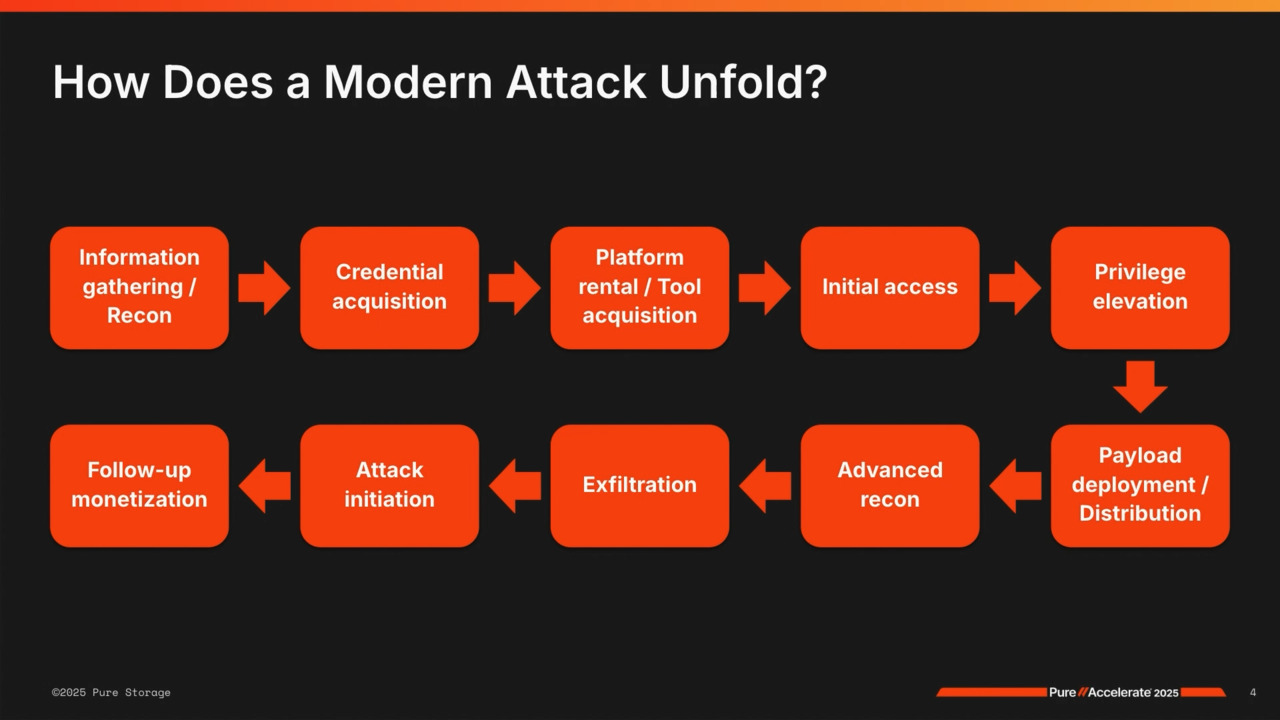
to outrun your friend. I don't fare too well in that scenario, but that's OK, Andy. Well, we'll move on here. So you know, what does the modern attack look like here? Yeah, so when we think about, you know, criminal threat threat actors, that's what we're gonna stick to for right now, OK, um,
and by the way, I generally like to make these interactive so if you have questions as we go, please raise your hand and let's make sure we're addressing what you guys want to hear and know about, um. So when we think about this, what, what happens is the criminal threat actors really in a lot of cases are not that sophisticated, OK?
The, the people that are actually attacking you often function much more as business people than technologists and what I mean by that is they're gonna spend a lot of time up front to do research on your environment. They're gonna figure out if you have a cyber insurance policy, what the value of that policy might be.
They want to figure out who has deep pockets, who's even worth attacking, who's likely to pay, who isn't. Once they've made that decision, these folks generally go on the dark web and they'll go to one of the more prominent attack groups, somebody like uh a lock bit for instance, and they'll actually rent their criminal platform or ransomware as a service platform
from these providers for a very small amount of money, usually like a couple 100 bucks a month. Once they've done that, they're gonna go to a shop next door on the dark web and they're gonna buy credentials into the environment they want to attack from what's called an initial access broker or an IAB. IABs are the groups that run fishing campaigns and watering hole campaigns to actually
collect credentials, OK? So it's again not the attacker that's usually running those attacks. They're gonna go out and buy the credentials in. The credentials are usually regular user credentials, so they'll come in, they'll log in as Jason Walker into your environment into the environment, then they'll use the rented tooling that they have to elevate their privilege,
so they want to get admin credentials. Once they've done that, they can then move laterally across the environment pretty seamlessly, so they'll do some discovery, they'll figure out where your most critical assets are, what are your important applications, what's getting the most hits, where are your files. They'll do that discovery,
they may do some data exfiltration along the way and they'll lay in a ransomware payload. Now, the important thing to understand about ransomware. Is that nobody can detect it in your environment before it starts encrypting data. Why is that? It's because ransomware payloads run in memory on a host,
OK? They don't write signatures to disk. Once the payload is installed, it runs in resident in memory as a known process. All footprint gets erased from the host from the disk itself. That's why it's so hard to detect. The only way that you could really detect ransomware running in your environment before
it starts encrypting data is to be able to take an in memory snapshot of every running host in your environment, quickly compare those to known bad signatures, uh, to identify them before an attack occurs. And oh by the way, all ransomware variants nowadays are polymorphic, which means they constantly change, so having a known signature base is nearly impossible.
So the ransomware is running now in the background and on the host, users are working with their files, right? So they're working with unstructured data, so Word docs, Excels, PowerPoints, and when a user goes to save a file, the ransomware payload running in memory is gonna pick up on that action, and two things are gonna happen.
The first is the payload is gonna make a copy of that file. And it's gonna pre-encrypt or corrupt that file. So what it does technically is it skips the 1st 512 bytes of the file. It'll encrypt up to the next meg and it leaves anything past that alone. It's a really high speed operation that you'll never detect.
It's gonna take that bad file and it's gonna put it into a volume shadow store or hidden directory on the host. Second operation then is it's gonna take a good copy of the file and put it where the user expected. So now to an end user, nothing bad's happening, so just another day at work.
When the bad guy decides or gal decides that they're gonna try to make money, they use a command and control service from that rented platform in the cloud. They're gonna call into your environment and say encrypt, and when they do that all the files from the good directory are gonna get deleted all the files from the bad directory are gonna get moved into their place,
so it's gonna look like a very high speed encryption campaigns taking place, but a lot of it was done in the background. So again, you know, when these attackers come into your environment, you know, they're laying a lot of foundational uh uh payload basically or indicators of compromise. They'll also do some things to retain access,
right? So they might have other uh back doors that they'll plant, right? And a lot of times what'll happen after an attack is then they'll sell those to other threat actors. So if you hear about a company maybe getting attacked twice, it's not likely that the first attacker came back.
What's more likely is they've sold those indicators to someone else to then launch their attack. Does that make sense? OK, plenty of customers, uh, you know, out there, uh, you, you touched on this, Andy, that's why, you know, why can't we stop the modern attack, but what are the, what are the core activities that, uh,
that we're looking at? You mentioned some of it already trying to be able to, to see things in advance a visibility aspect of it. Yeah, so, so you know, when you think about the this whole attack vector, right? What do you do to protect yourself? So what can you do?
Well, there are really two areas to focus on nowadays. So if you go look at any federal guidances published, so go to the NSA, the CISA, FBI, White House, you know, for our global friends, uh, GCHQ in the UK, Signals Corp in Australia, the, the likes of all those, they really talk about two core aspects of security to focus in on.
The first is visibility. Visibility in this context means security analytics, which. In further context means something like splunk or elastic, maybe CrowdStrike, right? Some sort of platform that allows you to ingest logs, ingest data from various sources,
correlate that data very quickly to identify anomalies in your environment so that you can tell your cyber threat hunters, your security team, where to go take action and hopefully stop something bad from happening before it happens. So that's the visibility side, OK? The sec yeah, I say visibility is nice and that's where we see a lot of spending,
uh, going on to try to prevent, but all it takes is one and then you're dealing with the other side of it. That's right, and I, and I'll, I'll come back to visibility in just a second because I think it's really important to understand why I mention it in a storage context. Um, the second piece is resilience and resilience means having tiers or layers of
recoverability. And when you see the word resilience nowadays, what folks are telling you is that you have to have more than one source for recovery. I'll make a very provocative statement, and I know we have a lot of partners in the room, so I hope it's not too provocative, but backups nowadays are not enough, OK? No company should be relying solely on backups
for recovery. You have to have tiers or layers of recoverability. Now what I'm not saying is you don't need backups. You absolutely need backups in your environment. Part of the bigger picture of, of resilience, right? But it all plays into an architectural outcome now.
When we think about visibility. Your visibility, these, these platforms like a splunk are doing two things. They're ingesting data from a bunch of different places, like a bunch of endpoints, and they're correlating that data. You need to correlate data across three sources the network,
the endpoint, and the end user, all three, so you get good visibility. Doing that, then, uh, you know, it needs to be fast because you need to be able to orchestrate that output very quickly to your cyber team, OK? In security we have a notion, a concept called breakout time. Breakout time is a time between which I as a bad guy,
log into your environment with those credentials that I bought on the dark web, and I elevate my privilege to admin. That used to be measured in hours. Now it's down to about 30 minutes. So what this means in the visibility context is you have about a 30 minute window to ingest
data from the various sources, correlate that data across the network endpoint and end user domains, orchestrate that output to your cyber threat hunters so that they can take action before something bad happens. It's a lot of stuff to do and it has to be really fast now. Pure plays a significant role in this, believe it or not,
because of our architectural platform. The way that we build our storage solutions, right, having our own drives and having purity as our operating environment means that we don't have to rely on SSDs. In the context of visibility, SSDs are the enemy. SSDs slow that work flow down tremendously because SSDs all have little controllers built
onto them, and those controllers serve as bottlenecks to the ingest and correlate process. What it means is you can generally do one of the two fast, but not both. So you could either bring the data in really fast or you can correlate the data really fast but not both. So where you have pure in your environment.
We can make this threat hunt mission as we would call it, right, the analytics piece, much, much faster. So where you hear folks and your security team saying, hey, my splint queries are taking too long, or I'm not getting good results. Think pure because we can drastically and dramatically improve that process to get better
results much more quickly. Yeah, I had to switch to the slide because we don't wanna say it's all doom and gloom out there, but you should know what the threats are, but we do provide, uh, great advantages, uh, in here, and Andy just hit on one of them that speed of analytics to be able to detect.
You talk about the correlation that's happening in in the uh SIMSa world right now. That's a, that's a big area where we're seeing. Uh, a lot of that even coming back on prem as the costs are getting higher in the cloud, and, and also, you know, with these platforms you have to worry about data tiering, OK? So when you look at a splunk for instance,
there are really three tiers of data. There's a hot tier, a warm tier, and a cold tier. What happens in a lot of cases is people take that cult here and they put it up into the cloud. The minute you do that, your search queries just go through the roof in terms of time.
So where you can leverage the platform to bring to keep all that data on premise. We can do it one just as cost effectively as the cloud, but two, now it's all close and it's all on flash so we can make it really fast and improve that that search capability again. Alright, let's break it down because we said it in the title,
so we're contractually obligated to follow through on this. Uh, let's go down for the before, during, uh, and after the attack. Now before, before the attack, there's a lot of things that have nothing to do with pure necessarily that's, uh, that's critical, that's critical here. Yeah, so before an attack that, you know, look, the number one thing that you can do to protect
yourselves, bar none is good hygiene, OK? Hygiene in this context means patching, patch management. You need to be able to patch critical vulnerabilities in a day, highs within a couple of days, mediums within a week, and lows within a month. If you're not at that level, what I tell CIOs, having been a CISO in some very large
organizations in the past, is that's where you need to focus your team. That's where you need to really apply dollars, get to that point, get patching to the the the best point possible. Number 2 is all around authentication. Now, it's interesting because everybody thinks authentication is one-time passwords, right? You get a one time code,
uh, that helps you, you know, have a multi-factor to log in. Those are pretty easy to defeat nowadays. You can go out on the dark web and you can rent cell sites for about or sell micro sites for about $15,000 to $25,000 a month. When you do that, you're now on the carrier backbone, which means you can target and
intercept any text messages or phone calls coming into a device, OK? What that means is one time passwords aren't gonna save you. So what you want to focus on instead is credential vaulting. Think of something like a Beyond Trust or a cyber arc where you're taking all of your admin
credentials and vaulting them in a central point so that they have to be checked out by administrators, used for some point in time when they're done, they get checked back in, the credentials get changed, so no person ever really knows what that password might be. OK? The third area is around education.
And in this context, you know, education, um, we generally will think of things like cyber awareness training, Soish me campaigns, right? Trying to teach users, don't click on these bad links, don't open these bad attachments. I had a saying it's, it's, it's kind of crass, to be honest with you as a CISO that was you can't fix stupid, OK?
No matter what you do as a CISO or in the security role, somebody is always gonna do the wrong thing, right? And it's not intentional, it just happens. Somebody's gonna click the bad link they're gonna open the bad attachment. It's just reality.
So what you want to focus on with education instead, in my opinion. Our tabletop exercises. Bring your executive teams into a big room like this, put them up around a bunch of round tables and role-play an event from end to end. Hey, we were just hit by a by a cyberattack by a ransomware attack. What are we gonna do? It's 30 a.m.
on a Sunday morning. Who's calling the CEO to tell them? Because guess what you're not doing. Sending an email, right? How are we gonna communicate as a team? Because you're not gonna log into Zoom,
right, or Teams. How are we gonna restore Active Directory? How are we gonna recover our core applications to get our business back online? I'll tell you guys, from experience, it turns into Game of Thrones with your application teams figuring out who's gonna be first, right?
Because everybody's app is most important. So figuring out these things ahead of time with the executive team is absolutely critical, and things change all the time. So even though your executive might say, didn't we just do this last year, Andy, but things change and and roles change and people change and it's important to go through that, uh, go through that regularly.
Yeah, you know, once a year is good, every couple of years maybe with the board is actually great as well to give them context. And then the last piece is the visibility piece that we touched on again, security analytics, making sure that you've got a fast platform in place so that you can ingest data, correlate data, feed your cyber threat hunt team so that they can hopefully stop these
bad people before they do bad things, OK? And let's take a quick pause. Yeah, well, that's all and then to raise the cost of the attack here, yeah, that's right. Any questions or or comments so far? Is this making sense?
valuable, hopefully. OK. All right, we'll keep going you guys think, yeah, and obviously we bring a major advantages as Andy talked about by being able to adapt. To the changing requirements of some sort to try to to try that, you know, it used to be, you know, a few years ago you'd set static rules,
you'd point them at wherever your logs are going and you know that's how you do it, but things now are obviously as you guys know, changing rapidly and you need a performance tier and there and a lot of folks doing it in the cloud, but then the cloud costs because computes going higher to try to keep up. cloud costs are getting higher and we're seeing a lot of folks repatriating.
Uh, those workloads down to down to pure obviously down on prem, but you need something fast and performing, not just today but thinking ahead even then in the next year, 2 years as things are obviously gonna continue to change in the attempt to keep that. Discovery time as close to 0 as possible and then without letting it get too far out because you get too far out you have a major event
that's costing you a lot of money. Yeah, yeah, meantime to detect in terms of security, right? That's the focus you wanna try to bring that as close to zero as possible. So let's talk about during the attack, uh, you know, obviously when something happens there's a transitional phase, uh, that's going on in D.
Yeah, so during an attack, the, the very one thing that you really focus on is containment, right? And what does containment mean? It means isolating the event. So what do we wanna do? Generally we want to use virtual networking rules to isolate any of the affected hosts,
and so we want to quarantine them off into a separate area, right? What we don't wanna do ever if possible is turn the power off to the host. The minute you turn the power off, you've lost almost all, if not all of the forensic capability becomes really hard.
Let them run. If you have to go pull the network cable physically, but let the hosts run, keep them isolated for a period of time. It's like they used to see in the movies, you know, guy goes to try to steal the crown jewels, he triggers an alarm. They don't obliterate the guy because maybe he's working for someone.
Maybe something's going on. You don't know, but the walls collapse around and they isolate him and that's what you're wanting to do here. Absolutely. Yeah, and, and so you know in terms of other things, you know, you're you're gonna engage your emergency response team, right? So hopefully you have processes predefined and
in place you'll call your forensics folks in, you call legal support and other things and just generally rally the troops internally to start the recovery. Now with Pure, so for those of you that are pure customers, hopefully you've heard of safe mode, right? Pure during an attack, safe mode provides you an additional capability to protect yourselves.
Safe mode in security terms is a set of out of band multi-factor authenticated snapshots. Wow, that's a mouthful, right? What that means is that these snapshots are special snapshots that are indelible, OK? There's a lot of talk in the security world about immutability.
Immutability means that once state is written it can't be changed. Immutability way down here. Idelibility means not only is it immutable but it also can't be deleted by anyone. Idelibility is way up here, so immutability indelibility safe mode snapshots are indelible. So once they're created they can't be deleted
by anyone without going through a special support process. So the way that it works specifically is you have some number of named individuals in your organization who have a unique PIN number registered with pure support. If you need to fully delete data from a pure array when safe mode's enabled, two of those individuals have to call in support.
We validate them via the pens. We validate with the account team that they're still employees in good standing. Once that happens, they can open a remote session from your side, the customer side. Peer support can remote in and help delete the data that needs to be deleted.
Again, what it means is there's no person or people in your organization or outside, even with administrative credentials, who can fully delete data from a pure array without going through that process. So safe mode gives you a guaranteed point of recoverability right there on the array during an attack when the attack occurs.
Super important. if the one thing that you take away from this session, you know, if you're a pure customer is make sure you have safe mode enabled. The one thing that I like to say before I hand over back to Jason is safe mode is not a time machine, OK? If it's not on before the attack,
we can't go back in time and save you. Make sure it's on. Now, and that's great and that's why we, you know, we worked with the pure one team to create resiliency, uh, scoreboard, uh, to try to just highlight, you know, how much of the environment is protected with snapshots first of all,
turn on snapshots, we want that quickest recovery possible, which we'll get to here in the after, but also, you know, how much of your environment is protected by safe phone and the schedules are protected by safeone too no funny business and we don't go on. On, um, on, uh, you know, time, like calendar time, it's up time for the array,
so there's no funny business that attackers have learned to do with snapshots and schedules to be able to take care of that. So let's talk about it after the attack. Yeah, so after an attack there's only one thing that matters, and that is speed, OK? When you get attacked, your hair is on fire. You're going crazy.
You're getting phone calls every 5 minutes, people saying, you know, are we back up yet? If not, why not? When will we be? So speed is of the utmost importance. Now in this context again, what we want to focus on is resiliency. Resiliency means tiers or layers of recoverability.
So how do we do that? With Pure we focus on a three layer approach, OK? The first layer leverages safe mode snapshots on the primary tier. We want to have safe mode snapshots enabled and on that primary tier for 3 to 7 days, and I'll come back to this in a minute.
The second tier is a middle tier of lower cost storage. So in purest terms you might think of a flash array C or a flash array E or maybe a flash blade E. Cheaper storage where we're gonna take those snapshots from the primary tier, and we're gonna replicate them and keep them on that middle tier for as long as we can afford.
At least 30 days, preferably longer, 6 months to a year. For those can be helpful in the forensics. We'll come back to that spoilers, spoilers, go for it. Sorrying me. That's right, sorry buddy. And then the last tier of course is the backup tier and backups nowadays you've gotta have backups, but relegate them to long term data
retention and compliance, and we'll use them for recovery, uh, of other tiers of applications further down, and we'll, we'll talk about this in a minute. So when you get attacked. You always start your recovery at the point closest to the attack possible,
always. So what that means is if you had a snapshot that was 1 2nd before you noticed the attack, you would start there. If it was 1 minute, 1 hour, a day, we get as close to the attack as we can, we're gonna recover that snapshot into a sandbox environment, OK. Bring the incident response team in, let them
clean known indicators of compromise in security terms, OK? These are bad things that are, that might be running. They'll be very obvious to these folks, OK, it might be things like rootkits or running malware. The idea will be to clean up very quickly.
By very quickly I mean like an hour or a couple of hours, not hours or days. Get the business back online, then we're gonna shift over as Jason mentioned to that middle tier. We're gonna let our incident response team then work off that middle tier of snapshots where we can create as many copies as we want instantly
with no additional space overhead on those arrays. They can continue to run their tools there for the coming weeks, find the additional things they may want to clean up, nondisruptively move those changes back upstream from the middle tier. And from there then we have our backup tier again for long term data retention compliance
or recovery of of longer term things. So the idea again is tears of recoverability starting with the snapshots. Now why would we start with snapshots? Because that recovery is near instantaneous. We can recover any amount of data from a snapshot instantly on an array, literally as fast as you can type a command on a command
prompt or click a mouse button, we can recover any amount of data from those safe mode snapshots, right? So that's way faster than coming across the line from backups potentially, right? So we want to start with that, but our backups are still there and they're still, you know, important to us in other form.
Does that make sense? So, primary tier 3 to 7 days, middle tier of lower cost storage for a longer period of time, and our backup tier as well. Now, It is important to think about pure in terms of the backup tier, so especially like an archives tier, because where you can leverage Pure with our protection
partners like Commvault, uh, Rubric, Veeam, etc. We're able to provide additional layers of protection through safe mode one, so we can use safe mode to protect indexes and catalogs, OK? And I'll talk about that in a second, but 2, the amount of speed that you do get off the backup environment where you may need to leverage it is tremendously faster,
OK, than coming off of a white box disk-based solution. Now, why would we want to protect the indexes or catalogs because As an attacker, when I get into an environment and I elevate my privilege, once I have admin. Generally your backup solutions are using domain integrated authentication. So what that means is once I get admin, I now have admin on your backup environment as well.
Now what I probably won't do is go delete your backup files. Why? Because it's really noisy and it's expensive from an IT operational perspective. It takes a lot of time. What I'm gonna do instead is I'm gonna go after the backup jobs, so I'll modify the backup jobs in the background so that it looks like everything's
running normally, but I'm taking little pieces out maybe and disrupting them over time. Or 2, I'll delete or ransom the catalogs or indexes because when I do that it completely invalidates the backup files anyway. So it's a much cheaper operation. So Question of clarity of clarity, uh, you're talking about having
snapshots on safe mode protected, which I have my entire array protected for 30 days, and then additional, uh, maybe stepping down. Images, snapshots from servers running on an X to a C. How does safe mode work that would allow you to make those immutable for longer than 30 days? So the snapshots are, so the data is portable down to another array,
right? So we can basically re-safe mode those snapshots once they get to the CRAs and house them for a longer term purpose, right, for a longer term period. So the retention lock on the CRAs would be 180 days or yeah whatever make up a time, in essence, right, not 30, um, the other thing that
that. Right, yeah, so snapshot retention, right, so the schedules are protected. So this you're absolutely right, it's a regular snapshot schedule with extra retention. What safe mode's gonna protect you is on the manual eradication, the, the attacker attacker mode, and if some, if it's a manually,
uh, deleted snapshot, safe mode kicks in. Yeah, yeah, right, yeah, absolutely you have it on both you do it on both ways. Can't go. Right, yeah, so you can, we definitely, we'll definitely talk more. It's a great, it's a great point. We can definitely talk more.
We'll take that on. That's a great, great question. That's a question that we get, uh, all the time, uh, in this, uh, in this space. So, and so, so the, the last thing that I'll, I'll tell you is, you know, um, you know, again keep in mind indelibility is a key, you know, not just a mutability so as you're thinking through these solutions.
Make sure to think that through now. We, yeah, I was just gonna say I have a dispelling myth slide because I love Andy dispelling myths, but we'll have to delay that. We have an open forum that Andy will be participated in in the expo hall with, uh, Hector Monsignor, a former black hat.
Uh, in, in there, so be sure to come over to that. I'll be hosting that with, with Andy and Hector, and I'm definitely gonna have you dispel some myths in there for sure. Yeah, I think it's at 5:30, 5:30 this afternoon in the Expo hall, but we have our special guests, uh, from Pfier here, Mike Dunn, he's the director of storage and virtualization
architecture, Roat Gupta. Who's the director of IT for storage engineering. Thank you all for coming, and the reason why they're here is to tell us that Andy and I are full of crap. We're full of crap, and it's actually we're not even talking about all the right things, but, uh, we appreciate your approach to cyber in here and you know,
welcome. Thank you. Great to have you guys. Yeah, I guess just maybe we could follow up on this discussion. Uh, we're, we are doing this, uh, the safe mode. We're doing the 3 days local, right, on our local array.
Then we replicate the snapshots off to a slash C and it's 35 days, but that's our, that's our standard right now. Um, and you can set the retention period to. I don't know if there's a limit actually, the, a year or whatever, right? 3, 365 days.
When I set it up 30 days. OK. Well, the snapshot retention's longer. Safe mode's gonna be 30 days. So for manual eradication, 30 days is that's right. Yeah, that's the difference. That's the difference, sir. OK.
So Mike, yeah, you wanna tell us a little bit about, you know, what you guys are using safe mode for how it's, I guess we started with how it's configured. Yeah, that's good. Yeah, I mean it was, it's exactly if you remember a few years ago, I mean, ransomware, malware attacks seems like they, they took off the off ramp was was really um exponential of a few years ago,
you, you know all about this, but. So we're regulated, um, our, our business is regulated. We do a lot of banking and um a mandate came down that we had to have a mutable backups, right? That was kind of the first um mandate. And so we worked on that, we came up with a solution um through a vendor,
implemented it. And everybody can breathe a sigh of relief right now our, our backups are immutable, meaning they can't be deleted, they can't be um infected, whatever. But then we thought to ourselves, particularly with, with that ramp up of um ransomware attacks that recovering from a backup takes time,
right? If you're restoring a file or two, it's, it's pretty quick, but if you're restoring a database. Um, or terabytes of data. Um, it, it could take days, but like literally days, right, so. We partnered with Pure with safe mode and we
came up with that solution uh along with along with you guys. And we decided on the 3 days we just decide on safe mode, right? And that is our first layer. So if we do have an incident, it's gonna go to safe mode first, and I think Ro it we've actually, we've actually done not a ransom attack but we've
actually done a safe mode recover um for a data loss event that we had. Yeah, um, you guys, yes, and, and, and I can cover that. So first, thank you, um, pretty big full classroom. I wasn't expecting a good and Andy and Jason are not full of crap. uh, first person that's ever said that Andy, hey, we got away with one there again,
again, let me complete. I, it may change on Friday when I fly. That's it. There it is. Uh, so yeah, so, uh, we are committed, uh, fully safe mode, um, every we own, uh, we have, uh, safe mode is big for us, uh, as Mike mentioned, uh, it's a regulation, uh, to Pfizer.
Everything has to be immutable, and today we are 100% committed, um, and, uh, I didn't believe this recovery, uh, snapshots and safe mode, um, and of course you don't wanna wait for ransomware and hopefully never, um, but. We had one time instance a database was corrupted. Imagine, before safe mode snapshots,
your recovery path is back up. To me, backup should be touched as the last last option. It's not a storage. Um, luckily we we implemented safe snapshot, safe mode. Guess what? The whole recovery took us less than 20 minutes,
I correct me, right, uh, restoring from safe mode to snapshot, mounting to the host. Guess what? Backup was back, uh, the database was back in business in less than 20 minutes. So, so we, we know how important is that, and that's why we are saying that we are committed,
uh, it really helps, um, yeah, so restoring from backups could take time. Um, 3 days locally we are committed. We have 3 days, uh, on the array. So if something happens, we know we have instant recovery, um, then we have C, um, which is a little cheaper storage. I don't know about the pricing.
I'm told that it's cheap, um, but then we have long term, uh, retentions over there and then of course back up, and, and it's a default to all the, all of our arrays that we deploy the flash arrays, the default is 3 days safe mode, um. On the local array and then we do this the the replication over that's a that's a real outcome
because if you, you know, I, I love my career and have been backups, but if you try to do a recovery, it could take 48 hours to recover what you needed or even a small amount of time and then maybe it's not clean. And so you have to reset that process again. That's why Snap Snap touches your first line of defense, uh, in cases like that, and I call that the Florida man,
the accidental admin, you know, not necessarily ransomware attack. It's oops, I did it again, uh, and be able to, to tackle that. So that's a real outcome right there back up and running in 20 minutes. It's a that's incredible there. Yeah, uh, great, great. You, you wanna add something,
or I just wanna say what there's, um, so of course you know you go to the next level, um, speaking of the tabletops, you mentioned that that was actually good. It, it reminded me when we did our first tabletop for ransomware attack. Uh, it was, it was really well, um. Planned tabletop, it was done by a vendor that specializes in it and um.
You know, they started with uh minor, minor little issues like some people can't log in, right? Then people can't log in remotely, then applications start going down. It was all based on timelines, right? And Um, we're a really large company, so there's a lot of people in that room, a lot of people, different areas of responsibility,
right? storage, virtualization, backup, app owners, network, security. And um. It it's a great awareness, right? Remember this first one about.
How you would be in a real, a ransomware attack if you're not prepared, it, it was. It was chaos, you know, who's doing what, you know, who, what do we do first, etc. So, um, but speaking of that, um.
You can also use the snapshots, the immutable snapshots, safe mode for um. Sending your data into an IRA into an isolated recovery environment, um. Right? Because it's isolated, right? And you get your snapshot off your primary array or even off of a slash C you can send it
to another array in an IRA and that's where you do your recovery, right? And Keeping it again, keeping everything isolated from your production environment, so. Just want to mention that the tabletop reminded me and, and the table tops get better, right, you definitely need them you do DR exercises.
You needed to do Ransomware malware exercises as well. Attacks aren't the chickenpox. You don't get it one time itch a lot, uh, and then say thank God it's over. It's a, it's a constant and it's different. DR is different than a ransomware attack. How, how you respond to it. So the IRE is, you know,
the interesting thing with an IRE is you know separating compute from storage. So generally what I would recommend in that space is, you know, an IRE is great for. Bringing data in and housing it for a long period of time, uh, generally focused on your most critical applications, so top 5 or whatever it might be,
and then you, you isolate it from compute. You don't have compute running all the time, so you would, the theory is you would spin the compute on demand to then get the workloads running connected to the compute when something happens. By doing that, you keep the isolation level high. Um, vulnerabilities, by the way, you know, exploits don't run on storage arrays,
right? So ransomware isn't gonna run on a storage array. So where you've got the data living, right, it's relatively secure and pretty easy to contain and, and validate before you get back online. Um, now we, we'll have some dispelling myths around IRA too in that open for later on 5:30.
Be sure to, to come by, uh, and yeah, 11 thing I wanted to ask Mike a little bit about is, you know, we've kind of evolved the, the approach, you know, started with the recovery side and now we're kind of transitioning more toward that visibility side. What have you guys seen I guess in terms of the visibility and,
and how are you addressing that with with pure like. Are you doing some of the things that we were talking about? Yeah, um, uh, we work, we work closely with our cyber team, um, but they have their SEM. All they want is data, right? They want data.
Speaking of Charlie and big data and all this stuff, right, but it's the age of data, um. The, the spunk environment is huge, um, and, and we're actually um working, we're, we're rearchitecting it as we speak, um. We're gonna, we're gonna put our hot tier on an, on an XL XLR 5,
right? They're, um, they're being built right now and um we're gonna move our cold tier which today is running on, uh, and this is smart store by the way, so the cold is uh object-based. Today it's running on an object, a spinning disk object array. And uh extremely slow or we're talking long term archive type object array.
We're moving it to a flash blade S right? um so we're gonna have a really fast hot tier we're gonna have a really flat fast cold tier, um, the smarter tier and um so that that that's in the works but I go back to the cyber team. Today we, we, you know, we, we have capacity constraints with internal disk drives on the splunk and on the uh on the indexers.
So, uh, we feel having external storage is gonna allow us to grow the storage on demand for, again, for all the requirements that they're putting on us, for all the logs. It's, it's a tremendous amount of data, right? And, and it, and To do analytics on it, it needs to be fast, right?
You need, you need fast access to the data, and it's not just the hot tier, we do. You know, you do queries past 30 days. If it's running on a spinning array. It's gonna sit there forever, your result before you get your results. All right, so we got a couple of minutes left. We want to open it up to you all.
Do you have any questions, I guess for either us or for the fier team? I got you right here. Alright, boom, go ahead, Ted. Got a winner. Could you talk a little bit about capacity planning for the snapshots in the safe mode?
Actually, that's what this, by the way is our SE Scott Avidis, great SE, uh, he helps us with that, right? So why don't you tell him how you size it first. Yeah, in, in general, when we, uh, do our capacity planning for snapshots, we'll aim for, and we see on average about a 1% daily change rate to most applications,
so we'll conservatively size for about 2% daily change rate, um, and then we'll for the on or the local snaps in the flash array XL it's 3 days and then on the seasons it's 35 days. Another good tool if you already have. Data on Pure is you can go into pure one in the planning tool and you can actually size out what adding snapshots would look like to that environment and what that you could simulate
where your capacity would be after you've actually enabled snapshots to see, you know, or maybe about 55% full today. I don't wanna go back like past 70%. This adds this blows it up to 63%, right? So I'm good to add. I don't know, 7 days or 10 days or whatever the requirement for snapshots are.
Um, so in general, that's how we, we look at it. Um, and it's a lot easier once the data is on Pure and we have an idea of what that data looks like from an actual daily change rate perspective. If you don't have Scott, the general rule of thumb that I would use is 20%, OK? And the reality is it's snapshots that take the
space safe mode is a check box, OK, it's just a configuration protection and so when you turn snapshots on, that's what's going to consume storage. My general rule of thumb is 20%. So if your array is at 50% utilized from a capacity perspective today, expect you're gonna go to 60% when you turn when you turn snapshots on, checking the box for safe mode does nothing more.
The other thing to understand is that there is no performance implication to turning snapshots on on an array. OK? There is no performance overhead, so having snapshots enabled isn't gonna reduce the performance of the array, it's only gonna consume capacity.
Alright, we're out of time. We're out of time. I wanna thank, uh, our guest Mike Rohead. Scotty, we'll give Scotty some props. Andy Stone, thank you very much. We have a, we have a cyber resilience kiosk to ask any follow up questions, uh, for me, we have that open forum. I said it was all downhill from here,
but it's a great ride. It's a great ride downhill. Pick up a lot of speed. Uh, there's a lot of good cyber stuff going on, attend those, uh, and, uh, we'll talk to you later. Thanks everybody. Great, yeah.

We Also Recommend...
Personalize for Me