Skip to Content
Dismiss
Innovation
A platform built for AI

Unified, automated, and ready to turn data into intelligence.

Find Out How
Dismiss
June 16-18, Las Vegas
Pure//Accelerate® 2026

Discover how to unlock the true value of your data. 

Register Now
Dismiss
NVIDIA GTC San Jose 2026
Experience the Everpure difference at GTC

March 16-19 | Booth #935
San Jose McEnery Convention Center

Schedule a Meeting
2:39 Video

How to Perform Veeam Everpure Snapshot Offload To NFS

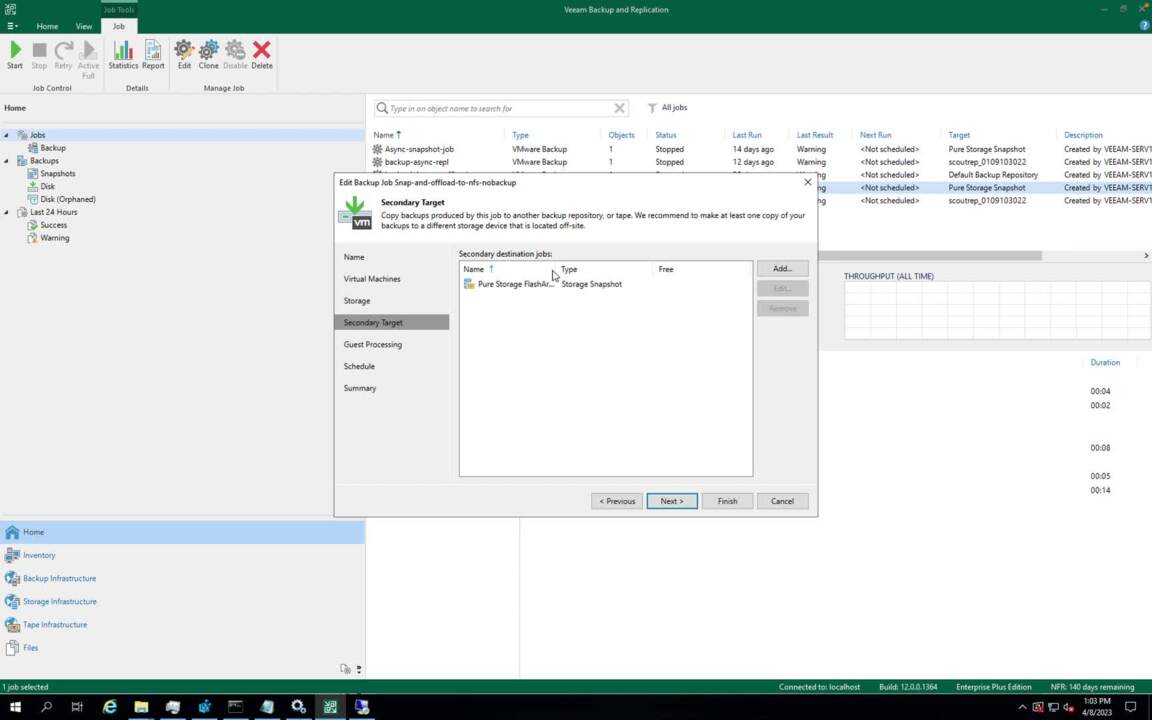
In this demo, learn how to offload snapshots to NFS with the Everpure Veeam USAPI Plugin.
Click to View Transcript
00:00
Welcome to my video on how to perform VM pure storage snapshot offload to NFS VM. Universal storage integration with pure storage has various options for performing snapshots and backup for primary applications. And one of the use cases is Wim pure snapshot offload to NFS. What does Flasher snap to NFS means it is a self backup technology built into the flash,
00:26
right? It comes with no additional software license and it has all the data management level features such as preserving compression while transit and data reduction capabilities across snapshots. There are some prerequisites to perform V pr storage snapshot offload job. You would need V M 12 and VM universal storage plug in version two for pure storage,
00:51
a purity version 6.3 to have the visibility of the offloaded snapshot on NFS target an offload application installed and set, set up on flash and the protection group is set up correctly on the volume to be protected. Running a wee off your job is a straightforward task to set up a pure snapshot offload job. You would need to configure VM snapshot only job on the V M server and then select configure
01:19
secondaries destination for the job. And next step at storage wizard select pure storage Flasher offload from the list of the secondary target and then set the retention time according to your requirements. Once the job is successfully configured and executed, the V B R will detect the offload relationship of the volume on flash a protection group and it will perform the
01:42
snapshot on the primary array and later will offload it to the configured NFS target. This is how simple it is to offload the snapshot to NFS target. You can perform the rest of the snapshot from server directly or from flash array. You can perform the VM snapshot restored from beam server storage infrastructure tab and go into the primary flash array storage volume and then the snapshot can be restored by expanding
02:10
the volume. Otherwise, you can also view the offloaded snapshot on flash array and can retrieve the snapshot from the offloaded target using command line with VM snapshot, offload to NFS. You can back up the snapshots for a longer period of time. And in case of any disaster scenario, you have the power to recover your primary data.
02:30
Thanks for watching this video and do check my other video on how to perform VM pure snapshot replication job.
  • Video
09/2025
Everpure FlashArray//X: Mission-critical Performance | Everpure
Pack more IOPS, ultra consistent latency, and greater scale into a smaller footprint for your mission-critical workloads with Everpure®️ FlashArray//X™️.
Data Sheet
4 pages
Continue Watching

* indicates a required field.

We hope you found this preview valuable. To continue watching this video please provide your information below.

This site is protected by reCAPTCHA and the Google Privacy Policy and Terms of Service apply.

Your Browser Is No Longer Supported!

Older browsers often represent security risks. In order to deliver the best possible experience when using our site, please update to any of these latest browsers.

Personalize for Me
Steps Complete!
1
2
3
Personalize your Everpure experience
Select a challenge, or skip and build your own use case.
Future-proof virtualization strategies

Storage options for all your needs

Enable AI projects at any scale

High-performance storage for data pipelines, training, and inferencing

Protect against data loss

Cyber resilience solutions that defend your data

Reduce cost of cloud operations

Cost-efficient storage for Azure, AWS, and private clouds

Accelerate applications and database performance

Low-latency storage for application performance

Reduce data center power and space usage

Resource efficient storage to improve data center utilization

Confirm your outcome priorities
Your scenario prioritizes the selected outcomes. You can modify or choose next to confirm.
Primary
Reduce My Storage Costs
Lower hardware and operational spend.
Primary
Strengthen Cyber Resilience
Detect, protect against, and recover from ransomware.
Primary
Simplify Governance and Compliance
Easy-to-use policy rules, settings, and templates.
Primary
Deliver Workflow Automation
Eliminate error-prone manual tasks.
Primary
Use Less Power and Space
Smaller footprint, lower power consumption.
Primary
Boost Performance and Scale
Predictability and low latency at any size.
What’s your role and industry?
We've inferred your role based on your scenario. Modify or confirm and select your industry.
Select your industry
Financial services
Government
Healthcare
Education
Telecommunications
Automotive
Hyperscaler
Electronic design automation
Retail
Service provider
Transportation
Which team are you on?
Technical leadership team
Defines the strategy and the decision making process
Infrastructure and Ops team
Manages IT infrastructure operations and the technical evaluations
Business leadership team
Responsible for achieving business outcomes
Security team
Owns the policies for security, incident management, and recovery
Application team
Owns the business applications and application SLAs
Describe your ideal environment
Tell us about your infrastructure and workload needs. We chose a few based on your scenario.
Select your preferred deployment
Hosted
Dedicated off-prem
On-prem
Your data center + edge
Public cloud
Public cloud only
Hybrid
Mix of on-prem and cloud
Select the workloads you need
Databases
Oracle, SQL Server, SAP HANA, open-source

Key benefits:

  • Instant, space-efficient snapshots

  • Near-zero-RPO protection and rapid restore

  • Consistent, low-latency performance


AI/ML and analytics
Training, inference, data lakes, HPC

Key benefits:

  • Predictable throughput for faster training and ingest

  • One data layer for pipelines from ingest to serve

  • Optimized GPU utilization and scale
Data protection and recovery
Backups, disaster recovery, and ransomware-safe restore

Key benefits:

  • Immutable snapshots and isolated recovery points

  • Clean, rapid restore with SafeMode™

  • Detection and policy-driven response


Containers and Kubernetes
Kubernetes, containers, microservices

Key benefits:

  • Reliable, persistent volumes for stateful apps

  • Fast, space-efficient clones for CI/CD

  • Multi-cloud portability and consistent ops
Cloud
AWS, Azure

Key benefits:

  • Consistent data services across clouds

  • Simple mobility for apps and datasets

  • Flexible, pay-as-you-use economics


Virtualization
VMs, vSphere, VCF, vSAN replacement

Key benefits:

  • Higher VM density with predictable latency

  • Non-disruptive, always-on upgrades

  • Fast ransomware recovery with SafeMode™


Data storage
Block, file, and object

Key benefits:

  • Consolidate workloads on one platform

  • Unified services, policy, and governance

  • Eliminate silos and redundant copies


What other vendors are you considering or using?
Thinking...
Your personalized, guided path
Get started with resources based on your selections.