Dismiss
Innovations
Everpure Simplifies Enterprise AI with Evergreen//One for AI and Data Stream Beta
Accelerate the transition from pilot to production with benchmark-proven performance, automated data pipelines, and a flexible consumption model.
Dismiss
June 16-18, Las Vegas
Pure Accelerate 2026
Discover how to unlock the true value of your data.
Dismiss
Innovation
A platform built for AI
Unified, automated, and ready to turn data into intelligence.
What Is Tiered Data Storage?

Enterprise data volumes are growing at unprecedented rates, with 181 zettabytes of data generated in 2025. Tiered storage is a data management strategy that classifies information into distinct tiers based on access frequency, business value, and performance requirements—then assigns each tier to the storage medium that best balances speed and cost. Organizations implement storage tiers to optimize performance, cost, and efficiency.
In this approach, frequently accessed and critical data is stored on high-performance media like NVMe SSDs for quick retrieval. Less frequently accessed or archival data is moved to lower-cost storage solutions such as hard-disk drives (HDDs) or cloud storage, which might have slightly slower access times but are more cost-effective.
This tiered structure forms a core component of information lifecycle management (ILM), helping organizations to balance the need for fast access to frequently used data with the cost-effectiveness of storing less critical or rarely accessed data on slower and cheaper storage mediums. Automated data tiering systems monitor data usage patterns and move data between tiers dynamically, ensuring the right data lands on the right storage medium without manual intervention.
This guide covers the history behind storage tiering, breaks down each data tier and the media that supports it, compares tiering to caching, explains automated and optimized tiering approaches, and outlines best practices for implementation.
Tiered storage data classes
Tiered storage data classes are categories of data based on certain characteristics, such as how data is used, how often it’s accessed, and how sensitive it is. These classifications dictate the most appropriate storage technologies for each data tier and their place in the overall architecture. The goal is to make data available and accessible and data management cost-effective, simple, and secure.
The number of tiers an organization uses depends on its data classification strategy, workload mix, and budget. A common model uses four to five tiers, each mapped to a data class with specific performance, availability, and cost requirements:
Tier 0: Mission-critical data
Tier 0 in data storage tiering refers to the highest and fastest tier, designated for mission-critical data that demands an extremely high-performance and low-latency data storage solution. This tier is crucial for applications and operations where any delay or downtime could lead to significant financial losses, reputation damage, or operational disruptions. Tier 0 storage should be used judiciously because of the cost.
Use cases: Real-time financial transaction processing, high-frequency trading platforms, AI/ML model inference, online gaming data requiring instant access, healthcare imaging systems, and database systems for critical infrastructure and emergency services
Types of storage media used in Tier 0 storage: Frequently accessed data should be readily available on high-performance storage such as non-volatile memory express solid-state drives (NVMe SSDs), in-memory databases, and custom hardware accelerators.
The key is matching storage investment to business impact: If a one-second delay costs $100,000 in a trading window, Tier 0 pays for itself quickly. Organizations that skip Tier 0 and try to run latency-sensitive workloads on general-purpose Tier 1 storage often discover the hidden cost of “good enough” performance—missed SLAs, degraded user experience, and workarounds that add operational overhead.
Tier 1: Hot data
Hot data refers to the most frequently accessed data, which requires scalable, high-performance storage for quick access. This data class is stored on the fastest storage media, such as SSDs, ensuring rapid retrieval and response times.
Use cases: Enterprise databases (ERP, CRM), transactional databases, frequently accessed customer records, email servers, active project files, and virtual machine environments
Types of storage media used in Tier 1 storage: SSDs, in-memory databases, and high-speed storage arrays
Enterprise-grade SSDs, high-speed SAS drives in double-parity RAID configurations, high-speed storage arrays, and hybrid storage arrays combining flash caching with HDD capacity. Some Tier 1 environments also use non-volatile dual in-line memory modules (NVDIMMs) for in-memory transaction processing.
The emphasis at this tier is balancing performance with cost. Flash caching in hybrid arrays can accelerate read-heavy workloads without requiring a full all-flash footprint.
Tier 2: Warm data
Warm data is important but not accessed as frequently as hot data. It’s stored on storage media that offers a balance between performance and cost, such as a combination of SSDs and traditional HDDs. This data is accessed occasionally but still needs to be readily available when needed.
Use cases: Monthly financial reports, historical sales data, regularly accessed archives, Tier 0/Tier 1 backups, business intelligence data sets, and older email archives
Types of storage media used in Tier 2 storage: Hybrid storage arrays combining SSDs with traditional HDDs
Hybrid storage arrays combining SSDs with traditional HDDs, SATA HDDs, cloud storage platforms, backup appliances, and lower-cost SSD tiers such as QLC flash. Recovery requirements often determine the specific media; backup copies supporting disaster recovery need faster restore times than analytics archives.
Tier 2 plays a critical role in business continuity. It frequently holds backup copies of Tier 0 and Tier 1 data, enabling rapid restoration if primary systems fail.
Tier 3: Cold data
Cold data comprises less frequently accessed information that still holds value but doesn't require high-speed access. Cold data is stored on slower and more cost-effective storage solutions, such as low-cost HDDs or cloud storage. This data class prioritizes cost efficiency over performance.
Use cases: Older project files, archival documents, historical records, completed project archives, regulatory compliance documents, legal discovery records, surveillance footage, and data sets retained for big data analysis
Types of storage media used in Tier 3 storage: HDDs, cloud storage, and tape storage
Archive data
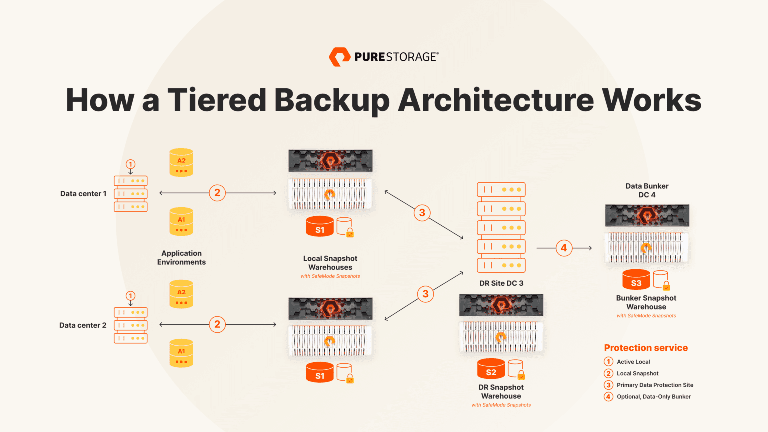
Archive data consists of data that is retained for compliance or long-term storage purposes—sometimes in a data bunker. It sits at the bottom of the hierarchy, moved to the most cost-effective and scalable storage options available. Organizations retain it for legal, regulatory, or operational obligations, sometimes for decades. Retrieval latency measured in hours is acceptable because the data is almost never accessed.
Use cases: Regulatory compliance documents, historical records for compliance purposes, historical financial filings, and legacy system backups
Types of storage media used for archive data: Tape storage, optical storage, and cloud-based archival solutions
What are the benefits of tiered storage?
The primary benefits of tiered storage are:
- Cost-effectiveness
Tiered storage prevents organizations from overprovisioning expensive, high-performance media for data that doesn't need it. Research shows organizations using a four-tiered storage structure can gain cost savings of up to 98% compared to untiered storage. - Performance optimization
By tailoring storage solutions to specific data requirements, tiered storage ensures that high-performance resources are reserved for critical applications. This eliminates the “noisy neighbor” problem where low-priority batch jobs compete with latency-sensitive applications for the same storage resources. Critical databases get the IOPS they need, while historical analytics run on cost-appropriate media without impacting production performance. The result is more consistent application behavior and fewer performance incidents for operations teams to troubleshoot. - Scalability
As data grows, tiered storage systems can easily scale by adding the appropriate storage media for each tier. Each tier expands independently—organizations add NVMe capacity for performance-sensitive workloads and cloud archival capacity for long-term retention without having to scale everything uniformly. This makes capacity planning simpler and more predictable. - Compliance and data retention
Regulatory frameworks like GDPR, HIPAA, and SOX often mandate specific retention periods for different data categories. Tiered storage aligns naturally with these requirements, enabling organizations to retain compliance data on cost-effective archival media while maintaining audit trails and retrieval capabilities. - Business continuity
Tier 2 storage frequently serves as the recovery layer in disaster recovery strategies. Maintaining backup copies of Tier 0 and Tier 1 data on secondary storage reduces recovery time objectives (RTO) and recovery point objectives (RPO), helping organizations resume operations quickly after an outage or cyberattack.
Automated storage tiering
Manual classification and data movement across tiers is impractical at enterprise scale. Automated storage tiering solves this by using policy-driven rules and real-time monitoring to move data between tiers without human intervention.
Modern storage systems include built-in tiering engines that continuously track I/O activity and access patterns. When a data block exceeds a predefined activity threshold, the system promotes it to a higher-performance tier. When access frequency drops below a threshold, the data is demoted to a lower-cost tier. This happens transparently—applications and users see no change in file paths or access methods.
Automated tiering is especially valuable in hybrid environments that combine SSDs and HDDs, or that integrate on-premises infrastructure with public cloud storage. It ensures that the storage system continuously adapts to changing workload patterns without administrators manually monitoring usage and relocating files.
Key capabilities to look for in an automated tiering system include granular policy controls (per-volume or per-application tiering rules), support for sub-LUN tiering (moving individual data blocks rather than entire volumes), and transparent operation that requires no changes to application configurations or file paths. The best implementations also provide reporting dashboards that show data distribution across tiers, promotion/demotion activity, and potential cost savings.
Optimized tiering
Optimized tiering goes beyond reactive, access-pattern-based automation. It uses proactive, policy-driven data governance to classify data by importance, retention requirements, and SLA expectations, then assigns each data type to the optimal tier from the moment of creation.
To implement optimized tiering effectively, organizations need to establish clear data governance policies, continuously monitor usage patterns, and adjust tiering rules as application requirements evolve. This often means tagging data at the point of creation with metadata that specifies its classification, retention period, and performance requirements—so the storage system can place it correctly from the start rather than waiting for access patterns to emerge.
When done correctly, optimized tiering improves storage return on investment by reserving expensive resources exclusively for the workloads that demand them.
Tiering vs. caching
The terms "tiering" and "caching" are sometimes used interchangeably, causing confusion. However, they refer to distinct concepts in data storage that operate in fundamentally different ways.
Tiering involves physically moving data between different storage tiers based on access patterns. Data is permanently relocated to a different storage medium, and the original location is freed.
Caching uses a temporary storage area to store frequently accessed data, improving performance by reducing the need to fetch data from slower, primary storage.
In practice, many storage systems use both techniques. Flash caching accelerates reads from HDD-based tiers, while tiering policies handle the long-term placement of data across the full hierarchy.
The future of tiered storage
Several trends are reshaping how organizations approach storage tiering:
- The rapid cost reduction of QLC flash is narrowing the price gap between flash and HDD. This is enabling all-flash architectures to replace traditional hybrid (SSD + HDD) tiers for Tier 1 and even Tier 2 workloads, simplifying tiering infrastructure while maintaining performance.
- AI-driven storage management is making tiering smarter. Instead of relying solely on access-frequency thresholds, next-generation tiering engines use machine learning to predict data movement needs before they happen, reducing the latency of promotion events and improving cache hit rates.
- Cloud-native tiering is also maturing. Organizations increasingly use object storage platforms with built-in lifecycle policies to manage warm and cold data across on-premises and cloud environments under a single policy framework.


Conclusion
Tiered data storage remains one of the most effective strategies for managing enterprise data growth without letting storage costs spiral out of control. By categorizing data into different tiers and assigning each to the storage medium that best fits its access pattern and business value, organizations achieve the performance they need for critical workloads and the cost efficiency they need for everything else.
For those looking to take data storage to the next level, the era of the all-flash data center has arrived. Embracing an all-flash storage infrastructure ensures efficient, cost-effective, lightning-fast performance across all tiers. Explore how Everpure all-flash storage arrays are redefining what tiered storage looks like in a flash-first world.
We Also Recommend...
Browse key resources and events

TRADESHOW
Pure Accelerate 2026
June 16-18, 2026 | Resorts World Las Vegas
Get ready for the most valuable event you’ll attend this year.

PURE360 DEMOS
Explore, learn, and experience Everpure.
Access on-demand videos and demos to see what Everpure can do.

VIDEO
Watch: The value of an Enterprise Data Cloud
Charlie Giancarlo on why managing data—not storage—is the future. Discover how a unified approach transforms enterprise IT operations.

BLOG
What’s in a Net Promoter Score?
For nine consecutive years, Everpure has maintained a Net Promoter Score of over 80. Find out how we did it and what it means for our customers.
Personalize for Me